Advanced Search QR (enAU)
In Advanced Search, you can use a number of search fields and filters to locate specific assignments. When only one assignment matches your search criteria, you will see the Assignment Detail page for that assignment. When multiple assignments match your search criteria, you will see a list of those assignments in Advanced Search Results. You can select and arrange the columns that appear in Advanced Search Results with Column Admin.
The screen shots in this document are generic, and your company’s interface may vary.
Access Advanced Search
- Select Advanced Search from the Assignments menu.
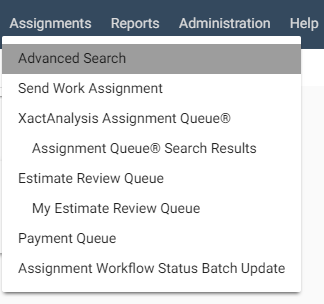
The Advanced Search page appears.
Search for assignments
- On the Advanced Search page, use the fields and menus to find specific assignments or types of assignments. See Advanced Search fields and menus for information about each field and menu.
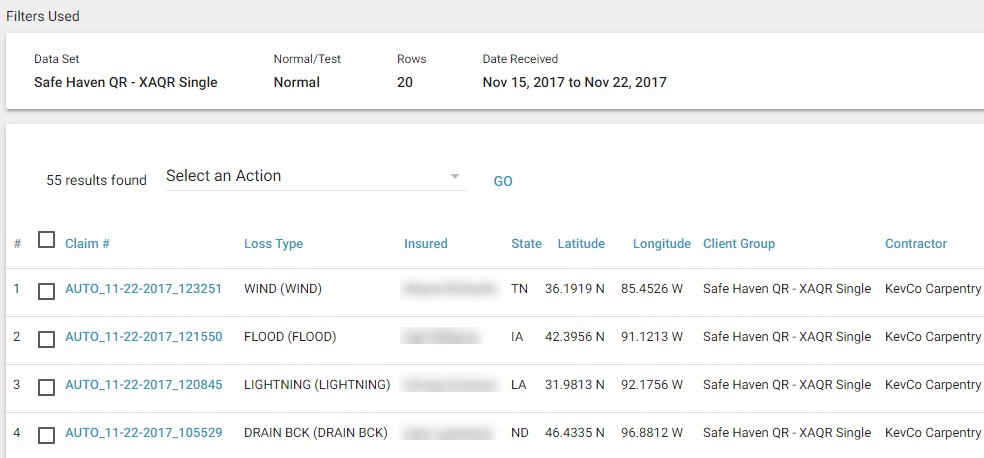
- Click Search. If one assignment matches your search criteria, its Assignment Detail page appears. If multiple assignments match your search criteria, the Advanced Search Results page appears.
Advanced Search Results
- Click an assignment to see its Assignment Detail page.
- The Select an Action drop-down menu allows you to complete various tasks for multiple assignments simultaneously. See Select an Action in Advanced Search Results for more information about this feature.
- You can click any column header to sort the list by that data.
- You can use User Column Admin to select and arrange the columns that appear in the list.
Advanced Search fields and menus
Search Criteria
Data Set
Your company may set up multiple data sets in order to organize and manage assignments and estimates. Select a data set to search for assignments in that data set.
Search By
You can filter your search by selecting either Country/Region/County to search by geographic location or Regional Office / Office Manager to filter your search by company offices.
Office Levels
Your company may set up levels of geographic or organisational hierarchies in order to organise and manage assignments and estimates. Select one or more areas or levels of the hierarchy to search for assignments in those areas or levels.
Claim Reference
A number assigned to an assignment by the insurer. Enter up to 35 claim references, separated by commas, to search for multiple assignments.
Insured
Enter the insured’s name to search for assignments by customer.
Contractor (Adjuster) Name
Enter the assigned assessor/builder’s name to search for assignments assigned to that assessor/builder. You can also enter a user name associated with a USER@ address.
Claim Handler Code
A claim handler code is assigned to every claim in Xactimate®. Enter the claim handler code to search for assignments with a specific claim handler.
CAT Code
Enter the catastrophe code to search for assignments with a specific catastrophe code.
XactNet® Address
The XactNet address is tied to the assessor/builder’s Xactimate program and is the identifier by which assignments are downloaded to the assessor/builder from XactAnalysis®. Enter a specific XactNet address to search for assignments sent to that assessor/builder.
Policy Reference
A number assigned to a policy by the insurer. Enter the policy reference to search for the assignment with that policy reference.
Desk Assessor
An individual assigned to an assignment to monitor its progress. Assignments may or may not be assigned a desk assessor. Enter the desk assessor’s name to search for assignments with that desk assessor assigned.
Reinspector
An individual assigned to an estimate to re-inspect a claim or property. Enter the reinspectors name to search for assignements assigned to that specific reinspector.
Postcode
Enter the postcode to search for assignments in that area.
Filter Criteria
Country
Select a country to filter your search by that country.
Assignment Type
An assignment can be assigned one of several possible assignment types: Structure, Contents, and Competition bid. Structure-type assignments include properties with damage to building items, such as plasterboard or masonry. Contents-type assignments include properties with damage to personal property items, such as appliances or furniture. Competition bid type assignments are sent to multiple assessors who each return a bid for the same property. Select an assignment type to search for assignments with that assignment type.
Job Type
An assignment can be assigned one of several job types, as customised by your company. Common job types include emergency, general, and mitigation. Select a job type to search for assignments with that job type.
Delay
An assignment can be marked as Delayed for various reasons. Select whether to display assignments with delays, without delays, or both.
Peril
An assignment can be assigned one of several types of peril. A peril is a general incident, like Theft or Fire, which necessitates a claim. Select a peril to search for assignments with that peril.
XactAnalysis Status
Statuses by which an assignment’s progress is tracked, for example, Delivered, Returned, or Cancelled. These statuses are automatically updated by XactAnalysis. Select a status to search for assignments currently at that status.
Workflow Status
Statuses by which an assignment’s progress is tracked, for example, Customer Contacted, Job Completed, or Client Billed. These statuses are updated by the assigned assessor/builder. Select a status to search for assignments currently at that status.
File Status
XactAnalysis classifies assignments as File Open, File Closed, or File Reopened. A file might be reopened if something needed to be added to the assignment after its initial completion. Select a file status to search for assignments currently at that status.
Third Party
Some assessors/builders use third-party vendors to assist with assignment estimation. Third-party vendors include claims managers, flooring analysis providers, roof measurement providers, and water damage process management providers. This menu allows you to search for assignments at a specific stage in the third-party process, or to exclude assignments using a third party from your search, for example, Analysis Requested, Analysis Not Requested, and Analysis Received.
Audit Results
Statuses by which an assignment’s audit standing is tracked. You can search for estimates with or without audit findings.
Onsite Results
In Xactimate, an assessor/builder can mark Yes or No for the following Onsite options: Onsite Inspection, Printed Onsite, and Onsite Payment. Select an Onsite option to search for assignments with that Onsite option marked Yes. Select Onsite Results - All to search for all assignments regardless of Onsite results.
Desk Assessor
Use this menu to search for assignments that do or do not have desk assessors assigned to them.
Service Provider Review Status
A service provider review would normally occur before the insurer review. You can search for assignments with a number of service-provider review statuses, like Not Yet Reviewed, Review Accepted, and Reviewed.
Reinspection Status
You can search for estimates with a number of reinspection statuses, including Not in Reinpsection Queue, In Reinspection Queue, Reinspector Assigned, Reinspector Accepted, Reinspection Completed, Reinspection Completed with Exceptions, Payment Reviewed, Payment Reviewed with Exceptions.
Approval Status
You can search for assignments with a number of approval statuses, for example, QA Not Yet Approved, QA Rejected, and Client Approved.
Reassignment Status
Assignments are sometimes reassigned to a different assessor or data set. Use this menu to search for assignments that have or have not been reassigned.
Home Area
Assessors/builders can be assigned home areas. These assessors/builders sometimes work in other areas for a number of reasons, for example, in the event of a natural disaster. Use this filter to search for assignments inside and outside home areas.
Normal
You can send a test assignment before sending a normal assignment to verify that the assessor/builder is properly set up. Use this menu to search for test assignments, normal assignments, or both.
20 Rows
Use this menu to select the number of assignments to be displayed per page in Advanced Search Results.
Filter Dates
Use the primary date filter menu to search for assignments with the following statuses or events occurring during the specified date range: Received, Delivered, Returned, Corrected, Cancelled, Rejected, Entered Queue, Date of Loss, Third Party Analysis Requested, and Third Party Analysis Received.
Select the check box next to the secondary date filter to search for assignments that were marked Job Started or Job Completed between selected dates.