XactNet Address Book
 Updated
by
Arianne G.
Updated
by
Arianne G.
In the XactNet® Address Book you can view and sort the list of assignees (assessors/builders) available to your company. The XactNet Address Book also includes other useful information about each assignee, including their Xactimate® version currently in use, date and time last connected, and qualification status.
The screen shots in this document are generic, and your company’s interface may vary.
Access XactNet Address Book
Select XactNet Address Book from the Administration menu.
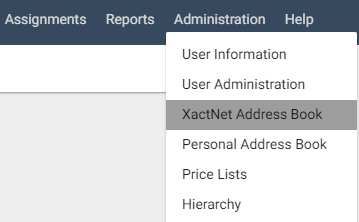
The XactNet Address Book page appears.
- Click a column header to sort the list by that information category.
- Click Export All To Excel to export contact information to an Excel spreadsheet.
- Click Qualify to qualify assessors or builders.
- Click Disqualify to disqualify assessors or builders.
Add contacts to the Personal Address Book
- Select the check box next to the contact you want to add.
- Click Add to Personal Address Book. A confirmation dialogue box appears. Click OK.
- Select Personal Address Book from the Administration menu to see the new contact added.
Apply address book filters
- Use the following filters:
Data Set
Select a data set from the drop-down menu, or select All Data Sets to see assignees associated with all data sets.
Office Levels
Select a regional or company hierarchy level.
Qualification
Select Qualified, Disqualified, Not Qualified, or All to see assignees with those qualification statuses.
Assessor/Builder
Type all or part of an assessor/builder name to search for a particular assignee. You can also type a user name associated with a USER@ address.
XactNet Address
Type all or part of an assessor/builder XactNet address in this field to search for a particular assignee.
Profile
A profile is a number/letter combination associated with each XactNet address. It specifies information or preferences tied to that particular XactNet address. An XactNet address may have more than one profile.
# of Rows
Select the number of rows shown at one time in the Search Results table.
- Click Search. Only those assignees that fit the specifications will appear.