Excel Management Reports
 Updated
by
Arianne G.
Updated
by
Arianne G.
The following Excel management reports are available in XactAnalysis® Quality Review (QR), depending on your company’s settings and your rights. See M.I. (Management Information) for help with generating reports.
Assignment Ageing
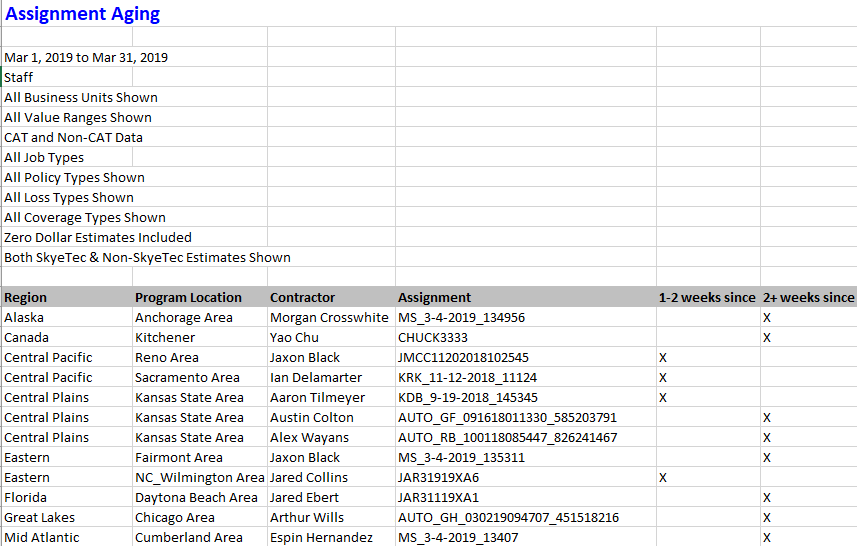
This report displays information about assignments with 1–2 weeks and 2+ weeks of inactivity, by area, assessor or builder, and claim reference. Inactive assignments have not been returned to XactAnalysis, cancelled, or rejected. This information helps to make you aware of assessors and builders with ageing assignments. Assignments are removed once they are returned, cancelled, or rejected.
The date range for this report is the 12 months prior to the report generation date. Ad hoc date ranges are not used, as the intent is to display current data rather than data for a specific period of time.
Assignment Approvals
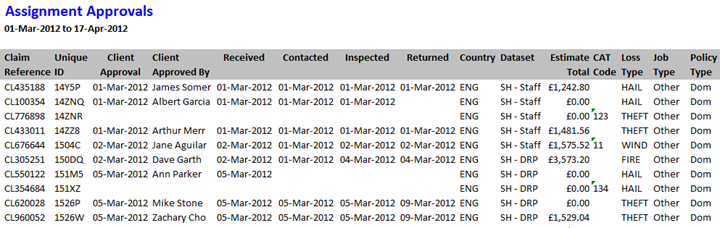
This report displays detailed assignment information, including the date each was Client Approved and QA Approved, and the name of the user that approved them.
Columns
Claim Reference: Number identifying the insurance claim
Unique ID: Master File Number (MFN) assigned by XactAnalysis
Client Approval: Date the estimate received client approval
Client Approved By: Name of the individual who gave client approval
Received: Date the assignment was first received into the Assignment Queue or assigned to an adjuster or contractor. If the assignment was sent to the Assignment Queue first, the Received date is updated when it is assigned to an adjuster or contractor. After being assigned the first time, the Received date is no longer updated (the Reassignment, Referral, or Collaboration statuses are used instead).
Contacted: Date the insured was contacted
Inspected: Date the site was inspected by the adjuster or contractor
Returned: Date the estimate was returned to XactAnalysis from the adjuster or contractor
Country: Country in which the assignment is located
Dataset: Assignment’s data set name
Estimate Total: Total estimate pound amount
CAT Code: Catastrophe code
Loss Type: Loss type (Collapse, Earthquake, Fire, etc.)
Job Type: Job type (General, Emergency, etc.)
Policy Type: Insurance policy type (Household, Commercial, etc.)
Insured: Name of the policy holder
Postcode: Postcode of the assignment location
Desk Adjuster: Desk adjuster’s name
Adjuster: Field adjuster/contractor’s name
XactNet Address: Adjuster/contractor’s XactNet address
XactAnalysis Status: Current XactAnalysis status of the assignment (Received, In Queue, Notified, Delivered, Returned, Corrected, Cancelled, Rejected)
Workflow Status: Current workflow status of the assignment (Ready for assignment, Attention needed, Customer contacted, Site inspected, Job started, Drying started, etc.)
QA Approved: Date the estimate received QA approval
QA Approved By: Name of the individual who gave QA approval
Review Status: Current review status of the assignment (Not Yet Reviewed, Assigned, Review Pending, Reviewed, Reviewed with Exceptions)
Reviewer: Name of reviewer assigned to review claim
IA Reviewer: Name of independent adjuster assigned to review claim
Contents Summary
This report displays comprehensive contents item data, including item description and replacement cost.
Columns
Claim Reference: Number identifying the assignment
User Name: User to which the estimate is assigned (user who is responsible for the whole estimate)
Priced By: Name of the individual who priced the item
Region: Geographic area
Added By: User ID of the individual who added the line item (a single contents estimate may be collaborated on by several adjusters)
Line Item Number: Number assigned to the line item
Quantity: Number of items
Age: Age of items in years
Reported Cost: Cost of items as reported by the insured
Original Description: Description of original contents item
Replacement Item Description: Description of replacement item
Replacement Source: Source of replacement item
Replacement Vendor: Vendor providing replacement item
Replacement?: Value (yes or no) indicating if the item is a replacement item
Unit Cost: Replacement item cost as set by the vendor
Item Category: Contents item category
Tax Amount: Tax amount for item
RCV Total: Replacement cost value total. Replacement cost value is the value of an item without deduction for depreciation.
Depreciation Percentage: Depreciation’s percentage of RCV Total
Amount of Depreciation: Pound amount of depreciation
ACV Total: Actual cash value total. Actual cash value is the value of an item after depreciation (RCV Total - Amount of Depreciation)
Received Date: Date the assignment was first received into the Assignment Queue or assigned to an adjuster or contractor. If the assignment was sent to the Assignment Queue first, the Received date is updated when it is assigned to an adjuster or contractor. After being assigned the first time, the Received date is no longer updated (the Reassignment, Referral, or Collaboration statuses are used instead).
Returned Date: Original date the estimate was returned to XactAnalysis
Corrected Date: Most recent date the estimate was corrected and returned to XactAnalysis
Coverage: Coverage type (Contents, Building, Other Structures)
Article Limit:Article Limit type (Electronics, Furniture, etc.)

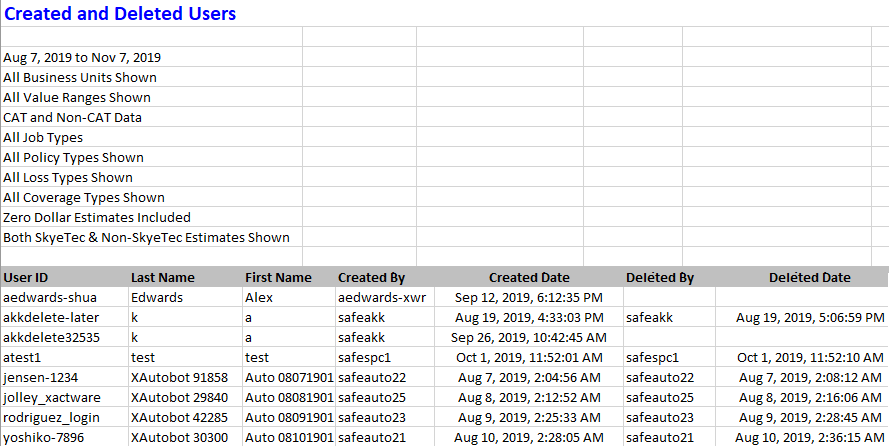
Created and Deleted Users
This report displays the users created or deleted within a specified time frame. It also lists the user who created or deleted the user. The default date range is one year, but can be modified before running the report. If a user has not been deleted, the Deleted and Deleted Date cells are blank.
Columns
User ID: The unique ID of the user who was created or deleted.
Last Name: The last name of the user who was created or deleted.
First Name: The first name of the user who was created or deleted.
Created By: The user ID of the user who created the user defined in the User ID, Last Name, and First Name columns.
Created Date: The date the user was created.
Deleted By: The user ID of the user who deleted the user defined in the User ID, Last Name, and First Name columns.
Deleted Date: The date the user was deleted.
Personal Rules
This report shows each personal rule that was triggered, and information about the estimate that triggered each rule. It helps you determine which personal rules are no longer needed.
Columns
User: Name of the user who triggered the rule
Dataset: Data set in which the rule was triggered
Date: Date and time the personal rule was triggered
Category: Personal rule category
Event: Personal rule event
Hierarchy/Location: Geographic location/hierarchy of triggered personal rule
Priority: Personal rule priority (All, Emergency, Normal)
Type: Personal rule type (All, Catastrophe, Non-catastrophe)
Contains: Shows when the estimate contains price list items under the following coverage types: Structural, Contents, or Other Structures
Loss Type: Personal rule loss type (Collapse, Earthquake, Fire, etc.)
Other: Personal rule’s specific triggering event (Any Occurrence, Increases By 10%, etc.)
Claim Reference: Number identifying the assignment
Estimate Amount: Estimate pound amount

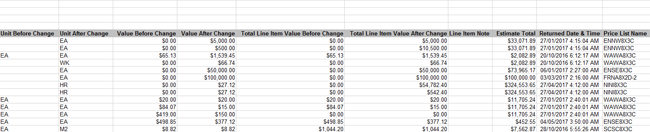
Price List Deviation
This report displays information about estimates with price deviations, including changes to price list item descriptions and values.
Columns
Dataset: Estimate’s data set name
Claim Reference: Number identifying the estimate
Region (Hierarchy): Geographic/organizational area
Adjuster (XN Address): Adjuster/contractor XactNet address
Adjuster Name: Adjuster/contractor name
Category Code: Code identifying price list category
Selector Code: Code identifying individual price list item
Description Before Change (Price List Item Description): Price list item description before change
Description After Change: Price list item description after change
Unit Before Change: Unit on which the item value is based before change (EA (each), SM (square metre), etc.)
Unit After Change: Unit on which the item value is based after change
Value Before Change: Item value before change (per unit)
Value After Change: Item value after change (per unit)
Total Line Item Value Before Change: Total item value before change
Total Line Item Value After Change: Total item value after change
Line Item Note: Note attached to line item in Xactimate
Estimate Total: Estimate total value
Returned Date & Time: Date and time estimate uploaded to XactAnalysis
Transaction Counts
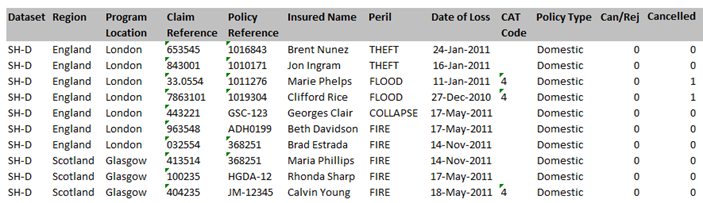
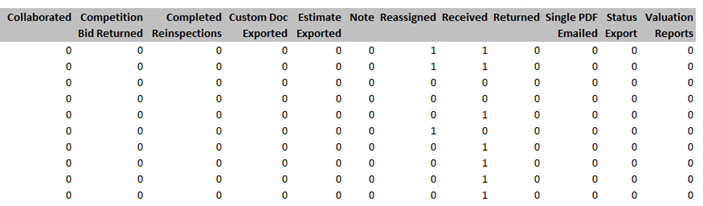
This report displays information about billable transactions/events, allowing you to monitor billable transaction activity during the month and compare it to the Billing Invoice.
Table 1
This table shows the number and type of billable events your company has incurred in a given data set. Billable events vary by company. Your billable events may be different than the events shown in the screenshot.
Columns:
Dataset: Data set in which the billable event occurred
Billable events: These events vary by company
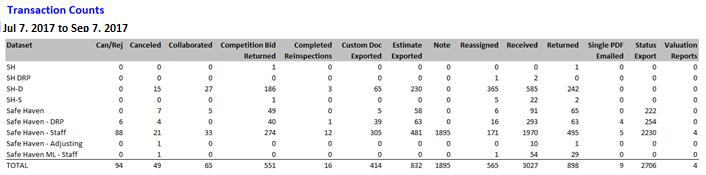
Table 2
This table shows the number and type of billable events your company has incurred by assignment.
Columns
Dataset: Data set in which the billable event occurred
Region: Geographic area
Program Location: Geographic area
Claim Reference: Number identifying the assignment
Policy Reference: Number identifying the assignment
Insured Name: Insured name
Peril: Peril (Collapse, Fire, etc.)
Date of Loss: Date of loss
CAT Code: CAT code
Policy Type: Policy type
Billable events: These events vary by company