XactNet Address Book
 Updated
by
Arianne G.
Updated
by
Arianne G.
In the XactNet® Address Book you can view and sort the list of assignees (adjusters/contractors) available to your company. The XactNet Address Book also includes other useful information about each assignee, including their Xactimate® version currently in use, date and time last connected, and qualification status.
The screen shots in this document are generic, and your company’s interface may vary.
Related: Personal Address Book, User Administration
Access XactNet Address Book
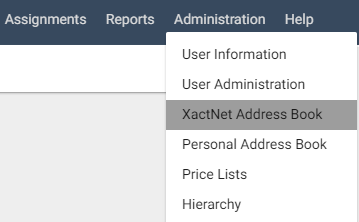
Select XactNet Address Book from the Administration menu.
The XactNet Address Book page appears.
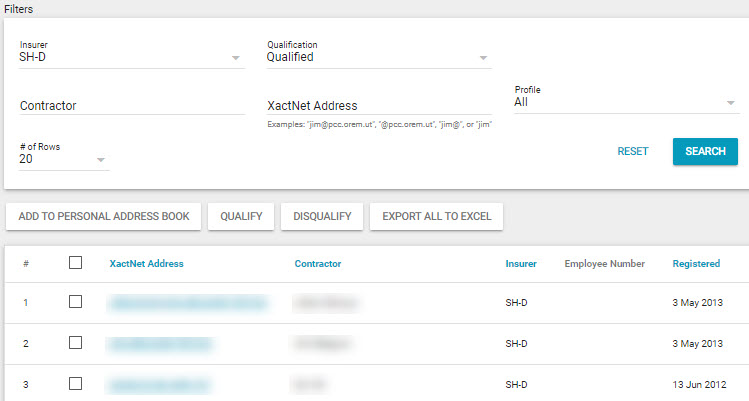
- Click a column header to sort the list by that information category.
- Click Export All To Excel to export contact information to an Excel spreadsheet.
- Click Qualify to qualify adjusters or contractors.
- Click Disqualify to disqualify adjusters or contractors.
Add contacts to the Personal Address Book
- Select the check box next to the contact you want to add.
- Click Add to Personal Address Book. A confirmation dialogue box appears. Click OK.
- Select Personal Address Book from the Administration menu to see the new contact added.
Apply address book filters
- Use the following filters:
Data Set
Select a data set from the drop-down menu, or select All Data Sets to see assignees associated with all data sets.
Office Levels
Select a regional or company hierarchy level.
Qualification
Select Qualified, Disqualified, Not Qualified, or All to see assignees with those qualification statuses.
Adjuster/Contractor
Type all or part of an adjuster/contractor name to search for a particular assignee. You can also type a user name associated with a USER@ address.
XactNet Address
Type all or part of an adjuster/contractor XactNet address in this field to search for a particular assignee.
Profile
A profile is a number/letter combination associated with each XactNet address. It specifies information or preferences tied to that particular XactNet address. An XactNet address may have more than one profile.
# of Rows
Select the number of rows shown at one time in the Search Results table.
- Click Search. Only those assignees that fit the specifications will appear.