Excel Management Reports
 Updated
by
Arianne G.
Updated
by
Arianne G.
- Assignment Ageing
- Assignment Approvals
- Benefit Tracking
- Claim Life Cycle
- Contents Summary
- Created and Deleted Users
- Desk Adjuster
- Duplicate Assignment per Job Type
- Job Status Roofing
- Measured Goals
- Personal Rules
- Pre-VAT Amount
- Price List Deviation
- Response Time by Contractor
- Salvage
- Transaction Counts
- Xactimate Version and Profiles
The following Excel management reports are available in XactAnalysis® Quality Review (QR), depending on your company’s settings and your rights. See M.I. (Management Information) for help with generating reports.
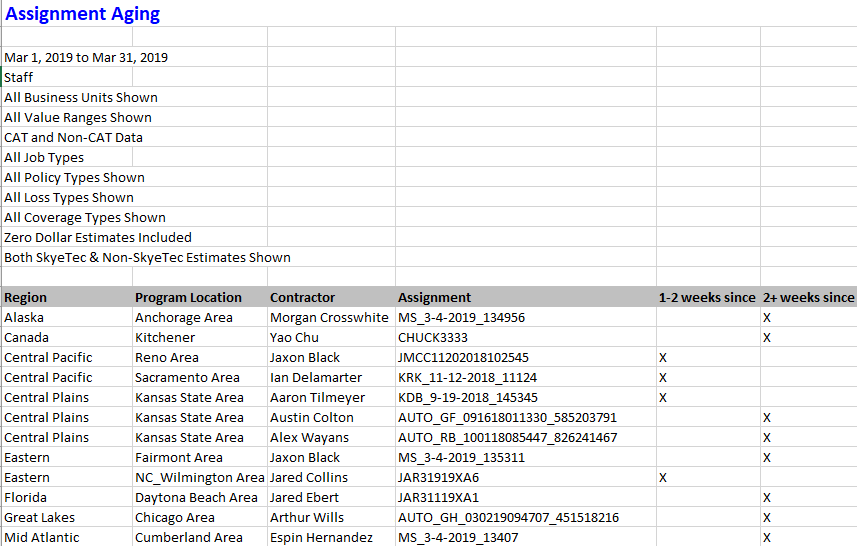
Assignment Ageing
This report displays information about assignments with 1–2 weeks and 2+ weeks of inactivity, by area, assessor or builder, and claim reference. Inactive assignments have not been returned to XactAnalysis, cancelled, or rejected. This information helps to make you aware of assessors and builders with ageing assignments. Assignments are removed once they are returned, cancelled, or rejected.
The date range for this report is the 12 months prior to the report generation date. Ad hoc date ranges are not used, as the intent is to display current data rather than data for a specific period of time.
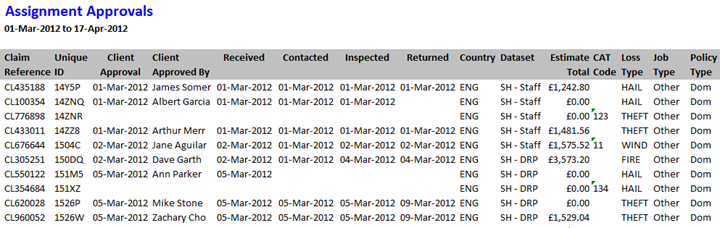
Assignment Approvals
This report displays detailed assignment information, including the date each was Client Approved and QA Approved, and the name of the user that approved them.
Columns
Claim Reference: Number identifying the insurance claim
Unique ID: Master File Number (MFN) assigned by XactAnalysis
Client Approval: Date the estimate received client approval
Client Approved By: Name of the individual who gave client approval
Received: Date the assignment was first received into the Assignment Queue or assigned to an adjuster or contractor. If the assignment was sent to the Assignment Queue first, the Received date is updated when it is assigned to an adjuster or contractor. After being assigned the first time, the Received date is no longer updated (the Reassignment, Referral, or Collaboration statuses are used instead).
Contacted: Date the insured was contacted
Inspected: Date the site was inspected by the adjuster or contractor
Returned: Date the estimate was returned to XactAnalysis from the adjuster or contractor
Country: Country in which the assignment is located
Dataset: Assignment’s data set name
Estimate Total: Total estimate pound amount
CAT Code: Catastrophe code
Peril Type: Peril type (Collapse, Earthquake, Fire, etc.)
Job Type: Job type (General, Emergency, etc.)
Policy Type: Insurance policy type (Household, Commercial, etc.)
Insured: Name of the policy holder
Postcode: Postcode of the assignment location
Desk Adjuster: Desk adjuster’s name
Adjuster: Field adjuster/contractor’s name
XactNet Address: Adjuster/contractor’s XactNet address
XactAnalysis Status: Current XactAnalysis status of the assignment (Received, In Queue, Notified, Delivered, Returned, Corrected, Cancelled, Rejected)
Workflow Status: Current workflow status of the assignment (Ready for assignment, Attention needed, Customer contacted, Site inspected, Job started, Drying started, etc.)
QA Approved: Date the estimate received QA approval
QA Approved By: Name of the individual who gave QA approval
Review Status: Current review status of the assignment (Not Yet Reviewed, Assigned, Review Pending, Reviewed, Reviewed with Exceptions)
Reviewer: Name of reviewer assigned to review claim
IA Reviewer: Name of independent adjuster assigned to review claim
Benefit Tracking
This report helps a company evaluate the financial benefit of a variety of claims and jobs.
Columns
Country: Country in which the assignment is located
Region: Region in which the program operates
County: A more specific geographic area within the region
Claim Reference: Number identifying the insurance claim
Property Type: The type of property at issue in the claim
Job Authorisation Date: Date a job was authorised by the insurance company
Supplier Name: The adjuster or contractor to which the assignment is assigned
Peril: Category of peril (Collapse, Earthquake, Fire, etc.)
Scale: Scope of the loss (small, medium, large)
Number of Trades: Number of trade categories needed to restore the loss
Complexity: Level of complexity of the restoration job
Emergency Mitigation/Restoration Repair: Whether the assignment requires emergency mitigation or restoration repair work (General, Emergency, etc.) (see Job Type)
Job Completion Date: Date the job was completed by the adjuster/contractor
File Status: Displays the current file status of the assignment (opened, reopened, closed)
Total Tax Amount: Total estimate of all applicable taxes
Total Profit Amount: Total amount of profit earned
Total Overhead Amount: Total estimate of all applicable overhead costs
Total Labour Amount: Total estimate of all labour costs
Total Materials Amount: Total estimate of all material costs
Total Equipment Amount: Total estimate of all equipment costs
Total Adjustment Amount: Total amount of any applied adjustment
Total Amount of Estimated Labour, Materials & Equipment: Total estimated amount of all labour, materials, and equipment costs (Total Labour + Total Materials + Total Equipment)
Total Amount of Estimated Labour, Materials, Equipment, Overhead & Profit: Total estimated amount of all labour, materials, equipment, overhead, and profit (Total Labour + Total Materials + Total Equipment + Total Overhead + Total Profit)
Total Amount of Estimate: Total estimate amount (including taxes)
Claim Life Cycle
This report displays the progress of assignments through the workflow and shows the times of specific events.
Columns
Country: Country in which the assignment is located
Region: Geographic area
County: A more specific geographic area within the region
Claim Reference: Number identifying the insurance claim
Date of Loss: Date of loss-causing event
Date & Time Assignment Sent to Contractor by XactNet: The time an assignment was assigned to a specific adjuster or contractor, ready for the recipient to download
Date Contractor Notified: The date that the recipient was notified by email, text, or phone of the pending assignment
Date Assignment Delivered to Contractor: The date the assignment was downloaded to Xactimate by the recipient
Date of Site Inspection: Date the assignment location was inspected
Date & Time Estimate Returned to XactNet: The time a completed estimate was uploaded to XactAnalysis from Xactimate
Date & Time Estimate Opened by Claim Adjuster: The time a returned estimate was opened by a claim adjuster
Date & Time Estimate Approved: The time a returned estimate was approved by a claim adjuster
Projected Start Date: The date a recipient was projected to start on an estimate for the assignment
Actual Start Date: The date a recipient started on an estimate for the assignment
Projected Completion Date: The estimated completion date for the assignment
Actual Completion Date: The date the assignment was completed
Date File Closed: The date the assignment was marked as closed
Projected Costs to Complete Work: The estimated cost to complete work on the assignment
Actual Cost to Complete Work: The actual cost to complete work on the assignment
Contents Summary
This report displays comprehensive contents item data, including item description and replacement cost.
Columns
Claim Reference: Number identifying the assignment
User Name: User to which the estimate is assigned (user who is responsible for the whole estimate)
Priced By: Name of the individual who priced the item
Region: Geographic area
Added By: User ID of the individual who added the line item (a single contents estimate may be collaborated on by several adjusters)
Line Item Number: Number assigned to the line item
Quantity: Number of items
Age: Age of items in years
Reported Cost: Cost of items as reported by the insured
Original Description: Description of original contents item
Replacement Item Description: Description of replacement item
Replacement Source: Source of replacement item
Replacement Vendor: Vendor providing replacement item
Replacement?: Value (yes or no) indicating if the item is a replacement item
Unit Cost: Replacement item cost as set by the vendor
Item Category: Contents item category
Tax Amount: Tax amount for item
RCV Total: Replacement cost value total. Replacement cost value is the value of an item without deduction for depreciation.
Depreciation Percentage: Depreciation’s percentage of RCV Total
Amount of Depreciation: Pound amount of depreciation
ACV Total: Actual cash value total. Actual cash value is the value of an item after depreciation (RCV Total - Amount of Depreciation)
Received Date: Date the assignment was first received into the Assignment Queue or assigned to an adjuster or contractor. If the assignment was sent to the Assignment Queue first, the Received date is updated when it is assigned to an adjuster or contractor. After being assigned the first time, the Received date is no longer updated (the Reassignment, Referral, or Collaboration statuses are used instead).
Returned Date: Original date the estimate was returned to XactAnalysis
Corrected Date: Most recent date the estimate was corrected and returned to XactAnalysis
Coverage: Coverage type (Contents, Building, Other Structures)
Article Limit:Article Limit type (Electronics, Furniture, etc.)

Created and Deleted Users
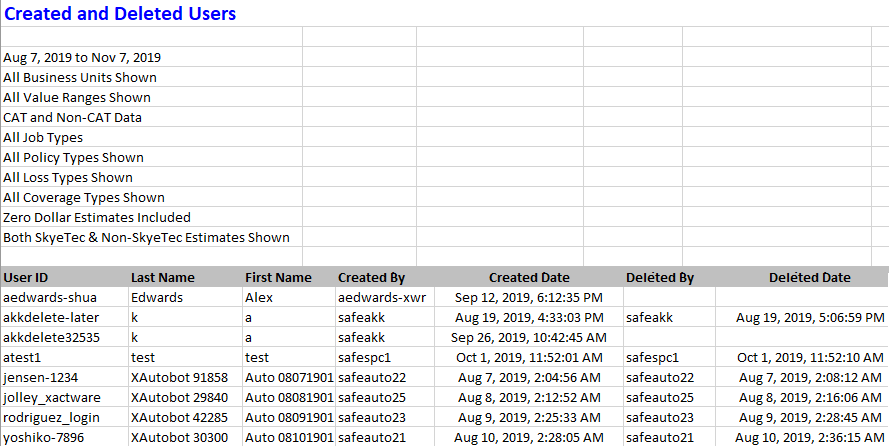
This report displays the users created or deleted within a specified time frame. It also lists the user who created or deleted the user. The default date range is one year, but can be modified before running the report. If a user has not been deleted, the Deleted and Deleted Date cells are blank.
Columns
User ID: The unique ID of the user who was created or deleted.
Last Name: The last name of the user who was created or deleted.
First Name: The first name of the user who was created or deleted.
Created By: The user ID of the user who created the user defined in the User ID, Last Name, and First Name columns.
Created Date: The date the user was created.
Deleted By: The user ID of the user who deleted the user defined in the User ID, Last Name, and First Name columns.
Deleted Date: The date the user was deleted.
Desk Adjuster
This report displays the number of claims assigned to desk adjusters in the different data sets and gives a breakdown of the individual claims for each desk adjuster, helping you oversee desk adjuster workloads.
Table 1 Columns
Desk Adjuster: Desk adjuster’s name
(Dataset Name): Number of claims assigned to the desk adjuster in the named data set
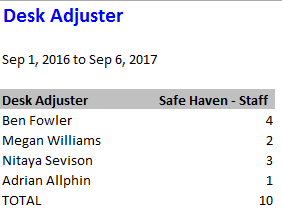
Table 2 Columns
Desk Adjuster: Desk adjuster’s name
Dataset: Assignment’s data set name
Claim Reference: Number identifying the assignment
Adjuster: Adjuster’s initials
Company: Assignment’s assigned contractor/claim rep
Estimate Value: Estimate value
Date Received: Date the assignment was first received into the Assignment Queue or assigned to an adjuster or contractor. If the assignment was sent to the Assignment Queue first, the Received date is updated when it is assigned to an adjuster or contractor. After being assigned the first time, the Received date is no longer updated (the Reassignment, Referral, or Collaboration statuses are used instead).
Date Contacted: Date adjuster was contacted
Date Inspected: Date assignment was inspected
Date Returned: Date estimate was returned to XactAnalysis from Xactimate

Duplicate Assignment per Job Type
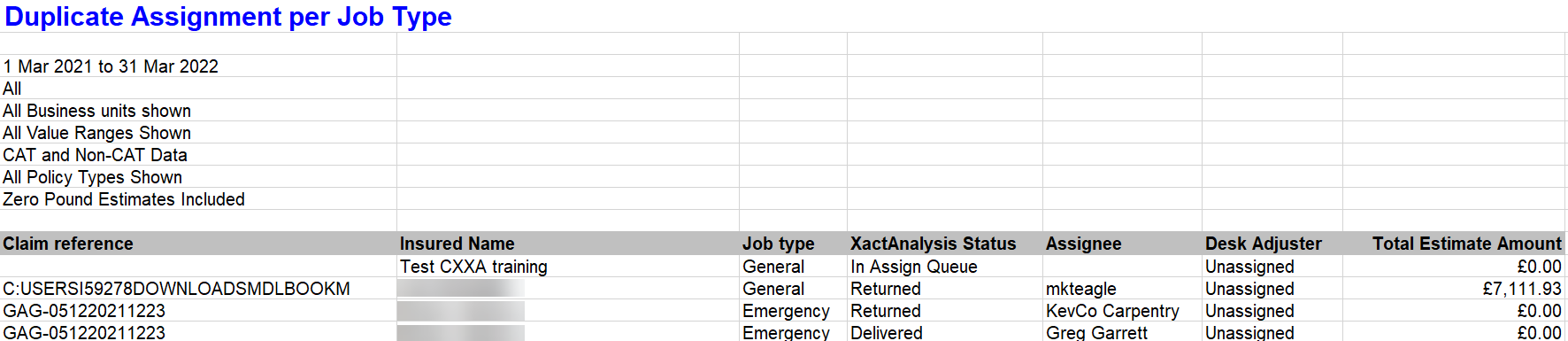
This report displays duplicate assignments (assignments with the same claim reference) by job type, helping you address any errors that caused the duplication.
Columns
Claim Reference: Number identifying the assignment.
Insured Name: Insured’s name
Job Type: (General, Emergency, etc.)
XactAnalysis Status: Assignment status (Assignment Received, Contractor Notified, etc.)
Assignee: Adjuster or contractor name
Desk Adjuster: Name of desk adjuster. Reads ‘Unassigned’ if no desk adjuster is assigned
Total Estimate Amount: Total estimate dollar amount
Job Status Roofing
This report helps a company monitor the assignment load and assignment progress of Preferred Service Providers (PSPs). Some companies give a favoured rating or favoured relationship to certain service providers, defining them as a PSP. To generate this report, you must select a PSP data set.
Columns
Contractor: Name of the PSP
Total Assignments: Total assignments assigned to the PSP
Job Started: Number of assignments with a “job started” status
Rejected: Number of assignments with a “rejected” status
Cancelled: Number of assignments with a “cancelled” status
Job Completed: Number of assignments with a “job completed” status
Measured Goals
This report helps a company measure how quickly a claim is being processed, to help companies determine whether they are meeting their internal goals.
Columns
Country: Country in which the assignment is located
Region: Geographic area
County: A more specific geographic area within the region
Adjuster: Adjuster’s name and XactNet address
Claim Reference: Number identifying the insurance claim CAT Code
CAT Code: Catastrophe code associated with this assignment
Photo(s) Uploaded: Notates whether an estimate had photos uploaded to it (Y or N)
# of Photos: Number of photos uploaded to an estimate
Returned # of Days: Number of days between when an assignment was received into XactAnalysis and an estimate was returned
Estimated Returned <= 5.0 days: Notates whether the time between when the assignment was received into XactAnalysis and the estimate was returned was less than or equal to 5 days (Y or N)
# of Days until Contacted: Number of days between when an assignment was Received into XactAnalysis and the insured was contacted
Received to Contacted <= 1.0 day: Notates whether the time between when the assignment was Received into XactAnalysis and the customer was contacted was less than or equal to 1 day (Y or N)
Inspected to Uploaded: Number of days between when a loss location was inspected and the estimate was uploaded into XactAnalysis
Inspected to Uploaded <= 1.0 days: Notates whether the time between when the loss location was inspected and the estimate was uploaded into XactAnalysis was less than or equal to 1 day (Y or N)
Estimate Amount RCV: Estimated Replacement Cost Value (RCV). Replacement Cost Value is the money equal to the cost of replacing lost, stolen, or damaged property without a deduction for depreciation
Estimate Amount ACV: Estimated Actual Cash Value (ACV). Actual Cash Value is the money equal to the cost of replacing lost, stolen, or damaged property after applying depreciation
Denial: Notates whether the claim was a covered loss or whether it received a partial denial or denial (Covered Loss, Partial Denial, Denial)
Zero Pound Estimate: Notates whether the estimate had a value of zero pounds (Y or N)
Inspected Onsite: Notates whether the assignment had an onsite inspection (Y or N)
Printed Onsite: Notates whether the estimate for an assignment was printed and given to the claimant onsite (Y or N)
Onsite Payment: Notates whether the assignment received a manual onsite payment (Y or N)
Inclusions: Notates whether an estimate has any inclusions (Inclusions is an Xactware term that refers to when too many line items are included in an estimate.) (Y or N)
Overlap: Notates whether an estimate has any overlap (Overlap is an Xactware term that refers to line items that include too much quantity, like more baseboard than would fit in a room.) (Y or N)
Depreciation Applied Frequency: Notates whether depreciation was applied to this estimate (Y or N)
Depreciation Severity: The percent depreciation applied to the estimate (Estimate ACV / Estimate RCV)
Peril: Category of loss (Collapse, Earthquake, Fire, etc.)
Single Adjuster: Notates whether a single adjuster or multiple adjusters worked on the estimate (Single, Multiple)
Overhead & Profit: Notates whether the estimate includes overhead and profit costs (Y or N)
Loss Location State: The state in which the property loss is located
Personal Rules
This report shows each personal rule that was triggered, and information about the estimate that triggered each rule. It helps you determine which personal rules are no longer needed.
Columns
User: Name of the user who triggered the rule
Dataset: Data set in which the rule was triggered
Date: Date and time the personal rule was triggered
Category: Personal rule category
Event: Personal rule event
Hierarchy/Location: Geographic location/hierarchy of triggered personal rule
Priority: Personal rule priority (All, Emergency, Normal)
Type: Personal rule type (All, Catastrophe, Non-catastrophe)
Contains: Shows when the estimate contains price list items under the following coverage types: Structural, Contents, or Other Structures
Loss Type: Personal rule loss type (Collapse, Earthquake, Fire, etc.)
Other: Personal rule’s specific triggering event (Any Occurrence, Increases By 10%, etc.)
Claim Reference: Number identifying the assignment
Estimate Amount: Estimate pound amount

Pre-VAT Amount
A value-added tax (or VAT) is a consumption tax that is added to the cost of goods purchased, much in the way a sales tax is added. The VAT may or may not be broken down on a receipt. The percent of VAT charged varies regionally. You will need to know the percent of the VAT for a specific region to get an accurate calculation.
Columns
Claim Reference: Number identifying the insurance claim
Job Complete Date: Date the job was completed by the adjuster or contractor
Insured’s Name: Name of the policyholder
Pre-VAT Estimate Value: Estimated pre-VAT value of a good (Estimated total cost of a good – VAT amount)
Authorised Amount: Value entered and approved by reviewer (probably includes VAT)
Price List Deviation
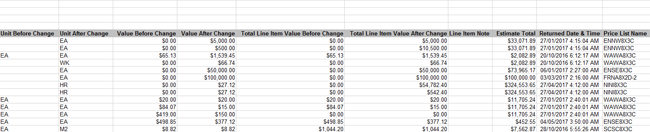
This report displays information about estimates with price deviations, including changes to price list item descriptions and values.
Columns
Dataset: Estimate’s data set name
Claim Reference: Number identifying the estimate
Region (Hierarchy): Geographic/organisational area
Adjuster (XN Address): Adjuster/contractor XactNet address
Adjuster Name: Adjuster/contractor name
Category Code: Code identifying price list category
Selector Code: Code identifying individual price list item
Description Before Change (Price List Item Description): Price list item description before change
Description After Change: Price list item description after change
Unit Before Change: Unit on which the item value is based before change (EA (each), SM (square metre), etc.)
Unit After Change: Unit on which the item value is based after change
Value Before Change: Item value before change (per unit)
Value After Change: Item value after change (per unit)
Total Line Item Value Before Change: Total item value before change
Total Line Item Value After Change: Total item value after change
Line Item Note: Note attached to line item in Xactimate
Estimate Total: Estimate total value
Returned Date & Time: Date and time estimate uploaded to XactAnalysis
Response Time by Contractor
This report displays the response time by a contractor along with different XactAnalysis statuses.
Columns
Contractor/Adjuster: Name of the adjuster or contractor
XactNet Address: Adjuster or contractor’s XactNet address
Country/Region: Country or region in which the adjuster or contractor operates
Enterprise ID: Specific ID that may be assigned by the enterprise
Data set: Data set with which this adjuster or contractor is associated
Total Estimates: Total Estimates assigned to this specific adjuster or contractor
Avg. Days until Contacted: Average amount of days between when notification was sent and when the insured was contacted
Avg. Days until Inspected: Average amount of days between when notification was sent and when the site of loss was inspected
Avg. Days from Contacted to Inspected: Average amount of days between when the insured was contacted and when the site of loss was inspected
Avg. Days until Returned: Average amount of days between when notification was sent and when an estimate was returned
Avg. Days from Inspected to Returned: Average amount of days between when a site of loss was inspected and when an estimate was returned
Avg. Estimate Value: Average value of estimates (Total value of all estimates / number of estimates)
Salvage
This report can help you evaluate the amount saved from items that are able to be salvaged. “Abandonment and Salvage” describes the forfeiture of property and the ensuing claim over that property by a second party. This phrase can be included in an insurance contract, enabling the insurance company to accept and salvage abandoned property.
Columns
Region: Geographic area or organisational unit
Office: A more specific geographic area within the region or office location
State: State in which the assignment is located
Claim Reference: Reference assigned to identify insurance claim
Claim Rep: Representative assigned to the claim
Data set: Data set name
Insured Name: Name of the policyholder
Date of Peril: Date of peril
Category Code: The category code in which a salvaged item belongs
Salvage Type: The salvaged items can be classified as Abandoned, Insurer, Insured, Not restored, Restored, or Salvor (A salvor is a specialist in salvaging inventory and equipment after an insurance peril such as a fire. A salvor examines, protects, and collects the inventory and then locates a buyer. The proceeds of salvage sale can be used to minimise the cost of an insurance claim.)
Salvage Amount: The value of the items salvaged
Transaction Counts
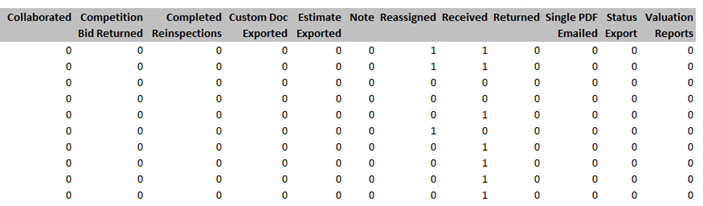
This report displays information about billable transactions/events, allowing you to monitor billable transaction activity during the month and compare it to the Billing Invoice.
Table 1
This table shows the number and type of billable events your company has incurred in a given data set. Billable events vary by company. Your billable events may be different than the events shown in the screenshot.
Columns:
Dataset: Data set in which the billable event occurred
Billable events: These events vary by company
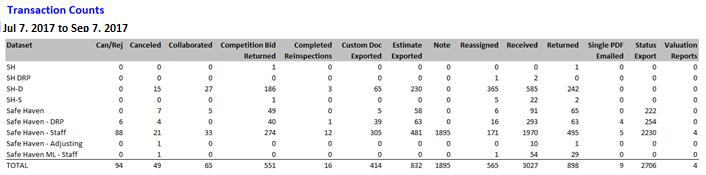
Table 2
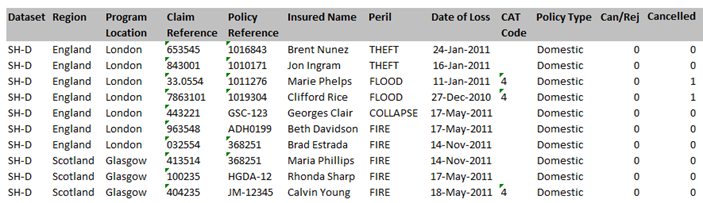
This table shows the number and type of billable events your company has incurred by assignment.
Columns
Dataset: Data set in which the billable event occurred
Region: Geographic area
Program Location: Geographic area
Claim Reference: Number identifying the assignment
Policy Reference: Number identifying the assignment
Insured Name: Insured name
Peril: Peril (Collapse, Fire, etc.)
Date of Loss: Date of loss
CAT Code: CAT code
Policy Type: Policy type
Billable events: These events vary by company
Xactimate Version and Profiles
This report displays information about the Xactimate setup for each user, including version, minor version, last connect date, last estimate upload date, and Xactimate profiles installed. This report allows you to verify that Xactimate users have the proper version of the software.
Columns
User Name: The adjuster or contractor
XactNet Address: The XactNet address associated with the adjuster or contractor
Xactimate Version: Xactimate version (based on the user’s last connection to XactAnalysis)
Minor Version: Xactimate minor version (based on the user’s last connection to XactAnalysis)
Last Connect Date: Date the user last connected to XactAnalysis
Last Estimate Upload Date: Date the user last successfully uploaded an estimate to XactAnalysis
Profiles Installed: Xactimate user profiles installed