Text Management Reports
 Updated
by
Arianne G.
Updated
by
Arianne G.
- Average Value
- Adjuster/Contractor Utilisation
- Estimate Audit Results
- Estimate Breakdown By Department
- Estimate Breakdown by Trade
- Estimate Breakdown by Type
- Estimates with Sketches and Photos
- Frequently Used Items
- Initial Response Time
- Sub Limits
- Items Changed by Adjuster
- Peril Value Range
- Miscellaneous Items
- Payment Tracker
- Price Deviations
- Response Time
- Supplement
- Supplements and Corrections by Reason
- Peril
- Value Range
The following Text management reports are available in XactAnalysis® Quality Review (QR), depending on your company’s settings and your rights. See M.I. (Management Information) for help with generating reports.
Average Value
This report displays the number of estimates in each region / office level, their value, and their average value. This information helps you see geographic/organisational trends in estimate value.
- Select a geographic/organisational area link to see data for other levels of your hierarchy, including individual estimates.
Columns
Region / Office Level: Geographic/organisational area
Total Estimates: Number of estimates
Average Estimate Value: Average value per estimate (Total Estimate Value / Total Estimates)
Total Estimate Value: Total estimate value
% of Total Estimates: Percentage of total estimates
% of Total Estimate Value: Percentage of total estimate value

Adjuster/Contractor Utilisation
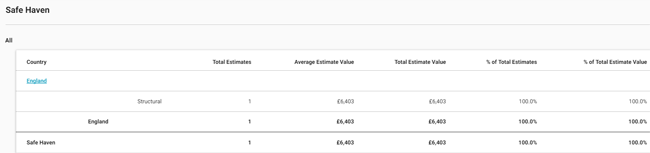
This report displays contents and structural estimate information by adjuster/contractor.
- Select a geographic/organisational area link to see data for other levels of your hierarchy, including individual estimates.
Columns
Region / Office Level: Geographic/organisational area
Total Estimates: Number of estimates
Average Estimate Value: Average value per estimate (Total Estimate Value / Total Estimates)
Total Estimate Value: Total value of estimates
% of Total Estimates: Percentage of total estimates
% of Total Estimate Value: Percentage of total estimate value
Rows
Contents: Contents items in Xactimate®
Structural: Structural items in Xactimate
Estimate Audit Results
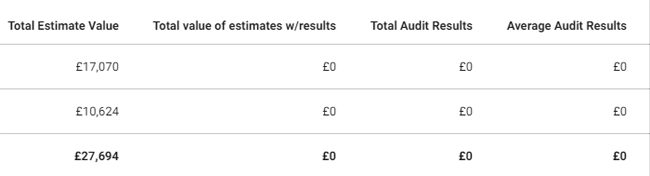
This report displays the audit results derived from estimate audits/inspections, helping you see the effectiveness of audits/inspections.
- Select a geographic/organisational area link to see data for other levels of your hierarchy, including individual estimates.
Columns
Region / Office Level: Geographic/organisational area
Total Estimates: Number of estimates
Estimates w/Inspection Audit: Number of estimates with audits/inspections performed
Estimates w/Inspection Findings: Number of estimates with errors found during audits/inspections
% of Estimates w/Inspection Findings: Percentage of estimates with errors found during audits/inspections
Estimates w/Inspection Results: Number of estimates with corrections made
% of Estimates w/Inspection Results: Percentage of estimates with errors found and corrections made
Total Estimate Value: Total estimate value
Total Value of Estimates w/Results: Total value of original estimates with errors found and corrections made
Total Audit Results: Total value of line items with errors found and corrections made
Average Audit Results: Average value per estimate of line items with errors found and corrections made (Total Audit Results / Estimates w/Inspection Results)

Estimate Breakdown By Department
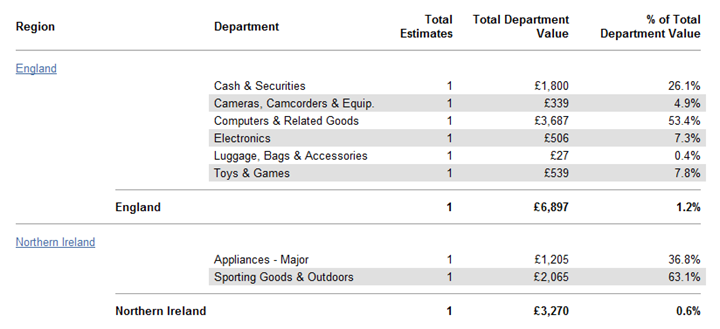
This report displays the percentage each contents department (Appliances, Cabinetry, etc.) contributes to the total estimate value, helping you see which contents items are most and least used.
- Select a geographic/organisational area link to see data for other levels of your hierarchy, including individual estimates.
Columns
Region / Office Level: Geographic/organisational area
Department: Contents department used for each line item
Total Estimates: Number of estimates
Total Department Value: Value of the estimate line items
% of Total Department Value: Percentage of total department value
Estimate Breakdown by Trade
This report displays each trade’s percentage of estimates’ total trade value (excluding O&P and tax). This helps you evaluate trade usage and value in your hierarchy.
Select a geographic/organisational area link to see data for other levels of your hierarchy, including individual estimates.
Columns
Region / Office Level: Geographic/organisational area
Trade: Trade
Total Estimates: Number of estimates
Total Trade Value: Total value of line items
% of Total Trade Value: Percentage of total trade value
Trades
In reports dealing with trades, the trade names are abbreviated. The following is a list of abbreviated trade names and their meanings (taken from the Labor Component SmartList in Xactimate):
CARP-FNC: Carpenter—Finish, Trim/Cabinet
CARP-FRM: Carpenter—General Framer
CARP-MECH: Carpenter—Mechanic
CLN: Cleaning Technician
CLN-F: Floor Cleaning Technician
CLN-R: Cleaning Remediation Technician
CLN-S: Cleaning – Supervisory/Administrative
CNC: Concrete Mason
DMO: Demolition Labourer
DRY: Drywall Installer/Finisher
ELE: Electrician
EQU: Equipment Operator
FEN: Fencing Installer
FLR: Flooring Installer
FLR-W: Wood Flooring Installer
HDW: Hardware Installer
HMRT: Hazardous Materials Remediation Technician
HVC: Heating / A.C. Mechanic
INS: Insulation Installer
LBR: General Labourer
MAS: Mason Brick/Stone
OHD: Overhead Door Installer
ORI: Ornamental Iron Installer
PLA: Plasterer
PLM: Plumber
PNT: Painter
RFG: Roofer
RFG-M: Membrane Roofing Installer
SDG: Siding Installer
STL: Steel Worker
STU: Stucco Installer
SUPERC: Commercial Superintendent
SUPERR: Residential Superintendent
SUB: Non Labour item
TIL: Tile/Cultured Marble Installer
TRT: Trauma/Crime Scene Cleaning Technician
WPR: Wallpaper Hanger
Estimate Breakdown by Type
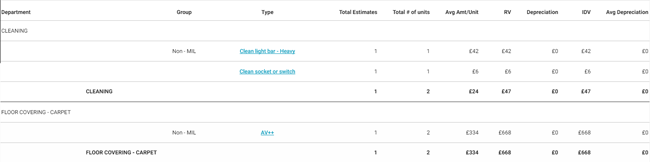
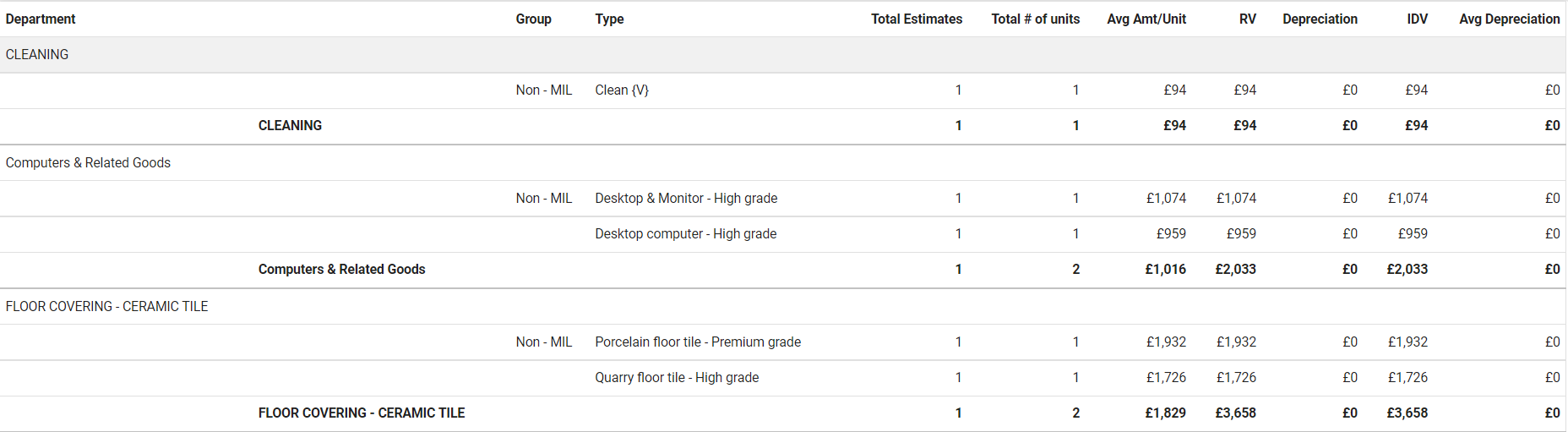
This report displays estimate information by contents department, group, and type. This helps you track which contents items are most and least used.
- Select a link in the Type column to see data for other levels of your hierarchy, including individual estimates.
Columns
Department: Department category from Xactimate SmartList
Group: Group from Xactimate SmartList (Items not in the price list are Non-MIL)
Type: Type of item from Xactimate SmartList
Total Estimates: Number of estimates
Total # Units: Number of units (items)
Avg Amt/Unit: Average pound amount per unit (RCV / Total # Units)
RCV: Replacement cost value
Depreciation: Value lost due to wear and tear
ACV: Actual cash value (RCV - Depreciation)
Average Depreciation: Average value lost due to wear and tear per estimate (Depreciation / Total Estimates)
Estimates with Sketches and Photos
This report displays the number and percentage of estimates that have been uploaded with or without sketches and with or without photos. This helps you monitor which adjusters/contractors are uploading photos and sketches.
- Select a geographic/organisational area link to see data for other levels of your hierarchy, including individual estimates.
Columns
Region / Office Level: Geographic/organisational area
Total Estimates: Number of estimates
Estimates with Sketches: Number of estimates uploaded with a sketch
Estimates without Sketches: Number of estimates uploaded without a sketch
% Estimates with Sketches: Percentage of estimates uploaded with a sketch
% Estimates without Sketches: Percentage of estimates uploaded without a sketch
Estimates with Aerial Sketches: Number of estimates uploaded with aerial sketches
Estimates without Aerial Sketches: Number estimates uploaded without aerial sketches
% Estimates with Aerial Sketches: Percentage of estimates uploaded with aerial sketches
% Estimates without Aerial Sketches: Percentage of estimates uploaded without aerial sketches
Estimates with Photos: Number of estimates uploaded with a photo
Estimates without Photos: Number of estimates uploaded without a photo
% Estimates with Photos: Percentage of estimates uploaded with a photo
% Estimates without Photos: Percentage of estimates uploaded without a photo

Frequently Used Items
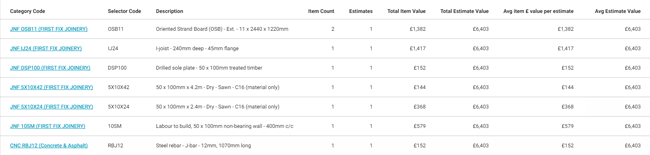
This report displays the price list items used in a given set of estimates, sorted from most frequently used to least frequently used.
- Select a link in the Category Code column to see data for other levels of your hierarchy, including individual estimates.
Columns
Category Code: Code for categorising a line item
Selector Code: Code for selecting a line item
Description: Line item description
Item Count: Number of times line item was used
Estimates: Number of estimates
Total Item Value: Total line item value
Total Estimates Value: Total estimate value
Avg Item £ Value per Estimate: Average line item value per estimate (Total Item Value / Estimates)
Avg Estimate Value: Average estimate value (Total Estimates Value / Estimates)
Initial Response Time
This report displays the original adjuster/contractor’s (the adjuster/contractor that first returned the estimate) response times for each step of the estimate process. It shows returned estimate data only. The “start” time for the response time calculations is Assignment Received date. This report helps you monitor adjuster/contractor activity, specifically their timeliness in progressing assignments.
- Select a geographic/organisational area link to see data for other levels of your hierarchy, including individual estimates.
Columns
Region / Office Level: Geographic/organisational area
Total Estimates: Number of estimates
Avg Days until Contacted: Average number of days for the status to change from Assignment Received (the date the assignment was first received into the Assignment Queue or first assigned to an adjuster and contractor) to Customer Contacted (recipient made first contact with insured)
Avg Days until Inspected: Average number of days for the status to change from Assignment Received (the date the assignment was first received into the Assignment Queue or first assigned to an adjuster and contractor) to Site Inspected (site inspected by assignment recipient)
Avg Days from Contacted to Inspected: Average number of days for the status to change from Customer Contacted (recipient made first contact with the insured) to Site Inspected (site inspected by assignment recipient)
Avg Days until Returned: Average number of days for the status to change from Assignment Received (the date the assignment was first received into the Assignment Queue or first assigned to an adjuster and contractor) to Returned (estimate returned to XactAnalysis from assignee)
Avg Days from Inspected to Returned: Average number of days for the status to change from Site Inspected (site inspected by assignment recipient) to Returned (estimate returned to XactAnalysis from assignee)

Sub Limits
This report displays sub limits and instances where they were or were not exceeded.
- Select a link in the Sub Limit column to see data for other levels of your hierarchy, including individual estimates.
Columns
Sub Limit: Type of sub limit (such as firearms, jewelry, money, and more) you set up on your account
Total Estimates: Number of estimates
Estimate Value: Estimate value
Sub Limit Total: Value of sub limits
Sub Limit % of Estimates: Sub limit value’s percentage of total estimate value
Sub Limit Item Count: Number of items that have sub limits
Single Limit Overage: Pound amount the estimates exceeded their sub limits
Single Limit Average Overage: Average pound amount the estimates exceeded their sub limits (Single Limit Overage / Number of Estimates with Overages)
Aggregate Limit Overage: Pound amount the estimates exceeded their aggregate limit (total coverage limit of the estimate), not just the sub limit
Aggregate Limit Average Overage: Average pound amount estimates exceeded their aggregate limit (total coverage limit of the estimate), not just the sub limit (Aggregate Limit Overage / Number of Estimates with Overages)
Number of Estimates with Overages: Number of estimates that went over their sub limit and/or aggregate limit
% of Estimates with Overages: Percentage of estimates listed that went over their sub limit and/or aggregate limit

Items Changed by Adjuster
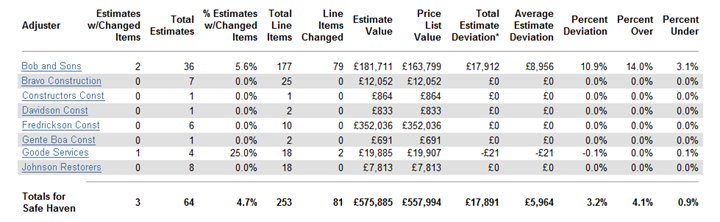
This report displays changed line item data, including the number of line items changed and the pound amount of estimate deviation as a result of changed items. This report helps you monitor changed line item activity by adjuster/contractor.
- Select an adjuster/contractor link to see data for individual line items.
Columns
Adjuster: Adjuster/contractor name
Estimates w/ Changed Items: Number of estimates with changed items
Total Estimates: Number of total estimates
% Estimates w/ Changed Items: Percentage of estimates with changed items
Total Line Items: Number of line items in all estimates
Line Items Changed: Number of line items changed (not including instances when the quantity of a line item is changed)
Estimate Value: Total estimate value (after items are changed)
Price List Value: Total price list item value (before items are changed)
Total Estimate Deviation*: Difference of total estimate value and total price list item value (Estimate Value – Price List Value)
Average Estimate Deviation: Average deviation per estimate with deviation (Total Estimate Deviation / Estimates w/ Changed Items)
Percent Deviation: Percentage of estimate deviation from price list value
Percent Over: Percentage of estimate deviation over price list value
Percent Under: Percentage of estimate deviation under price list value
Peril Value Range
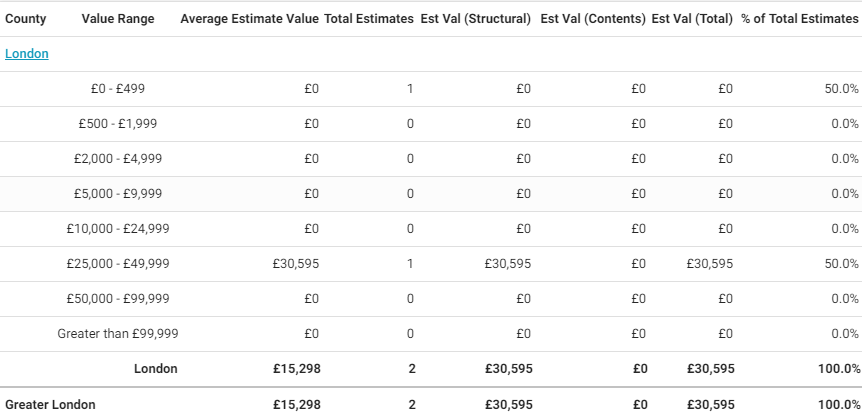
This report displays estimate information by peril and value range, helping you see trends in peril costs.
- Select a link in the Peril column to see the information by value range. Then select a geographic/organisational area link to see data for other levels of your hierarchy, including individual estimates.
Columns
Peril: Peril
Average Estimate Value: Average estimate value (Total Estimate Value / Total Estimates)
Total Estimates: Number of estimates
Total Estimate Value: Total estimate value
% of Total Estimates: Percentage of total estimates
% of Total Estimate Value: Percentage of total estimate value

Miscellaneous Items
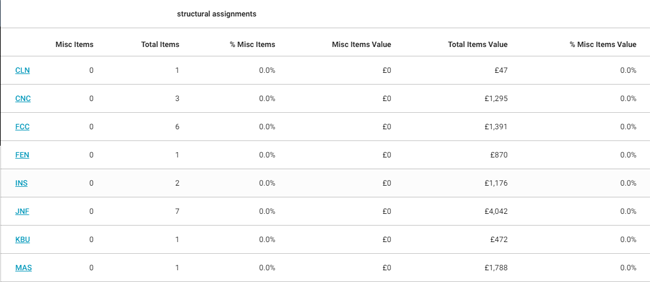
This report compares the number and cost of miscellaneous items (items that were not defined in the price list) with the number and cost of total items by structural category and contents assignments. Miscellaneous items may include user-defined items, items entered with the MISC Selector Code, and others.
- Select a trade category link to see data for levels of your hierarchy, including individual estimates.
Columns
Structural/Contents Assignments: Trade categories separated by structural and contents assignments
Misc Items: Number of miscellaneous line items used
Total Items: Total number of line items used
% Misc Items: Percentage of miscellaneous line items out of total line items
Misc Items Values: Total value of miscellaneous line items
Total Items Value: Total value of line items
% Misc Items Value: Percentage of miscellaneous line item value out of total line item value
Payment Tracker
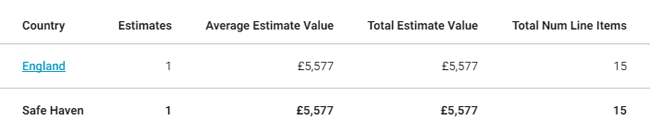
This report displays Payment Tracker data as recorded in Xactimate.
- Select a geographic/organisational area link to see data for other levels of your hierarchy, including individual estimates.
Columns
Region / Office Level: Geographic/organisational area
Estimates: Number of estimates
Average Estimate Value: Average estimate value (Total Estimate Value / Estimates)
Total Estimate Value: Total estimate value
Total Num Line Items: Number of line items
Average Num Line Items: Average number of line items per estimate (Total Num Line Items / Estimates)
Items Not Fully Paid: Number of items marked "Partial" in Payment Tracker
Contents Paid: Pound amount paid for contents damages
Contents Recoverable Depreciation: Pound amount the recoverable (covered by reinsurers) contents depreciated (decreased in value because of age and normal wear and tear)
Contents NR Dep: Pound amount the non-recoverable (not covered by reinsurers) contents depreciated
Structural Paid: Pound amount paid for structural damages
Structural Recoverable Depreciation: Pound amount of recoverable structural depreciation
Structural NR Dep: Pound amount of non-recoverable structural depreciation
Other Structures Paid: Pound amount paid for other structures
Other Structures Recoverable Depreciation: Pound amount of depreciation for recoverable structures other than the main structure
Other Structures Non-Recoverable Depreciation: Pound amount of depreciation for non-recoverable structures other than the main structure
ALE (Additional Living Expenses) Paid: Pound amount paid for additional living expenses, such as motel, restaurant, and Laundromat expenses
Total Paid: Total pound amount paid (Contents Paid + Structural Paid + Other Structures Paid + ALE Paid)
Total Recoverable Depreciation: Pound amount of depreciation for structures and contents covered by reinsurers (Contents Recoverable Depreciation + Structural Recoverable Depreciation + Other Structures Recoverable Depreciation)
Total Non-Recoverable Depreciation: Pound amount of depreciation for structures and contents not covered by reinsurers (Contents NR Dep + Structural NR Dep + Other Structures NR Dep)
Total Depreciation: Amount of depreciation for recoverable and non-recoverable contents and structures (Total Recoverable Depreciation + Total Non Recoverable Depreciation)
Total Remaining: Amount owed (Total Estimate Value - Total Paid)
Num Payments Issued: Total number of payments issued
Number of Item Overrides: Total number of item overrides
Item Override Amount: Pound amount of item overrides

Price Deviations
This report displays information about estimates where prices deviated from the price list prices. For example, a price obtained from a local source could differ from a price list price. This report helps you determine which adjusters/contractors are changing prices and the extent of the price changes.
- Select a geographic/organisational area link to see data for other levels of your hierarchy, including individual estimates.
Columns
Region / Office Level: Geographic/organisational area
Total Estimates: Number of estimates
Estimates w/Price Deviation: Number of estimates with price deviation (line item price changed from price list price)
Total Line Items: Number of line items
Line Items w/Price Deviation: Number of line items with price deviation
Estimate Value: Estimate value
Price List Value: Total estimate value of estimates using the check point price list for each line item (Estimate Value - Total Estimate Deviation)
Total Estimate Deviation: Difference between the estimate value and the price list value (Estimate Value - Price List Value)
Average Estimate Deviation: Average pound amount of deviations per estimate (Total Estimate Deviation / by Estimates w/Price Deviation)
Estimate Deviation %: Percentage of total estimate deviation from estimate value
Price List Deviation %: Percentage of total estimate deviation from price list value

Response Time
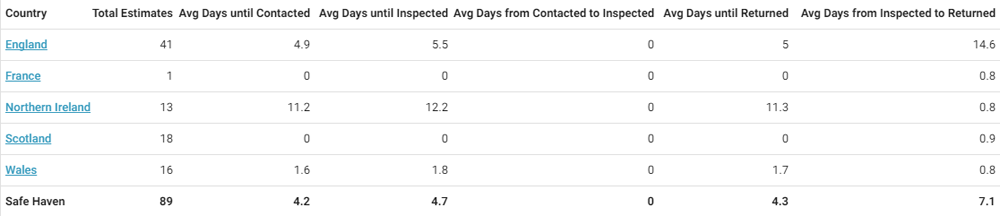
This report displays the last adjuster/contractor’s (the adjuster/contractor that last returned the estimate) response times for each step of the estimate process. The “start” time for the response time calculations is Assignment Received date. This report helps you monitor adjuster/contractor activity, specifically their timeliness in progressing assignments.
- Select a geographic/organisational area link to see data for other levels of your hierarchy, including individual estimates.
Columns
Region / Office Level: Geographic/organisational area
Total Estimates: Number of estimates
Avg Days until Contacted: Average number of days from status Assignment Received (the date the assignment was first received into the Assignment Queue or first assigned to an adjuster and contractor) to Customer Contacted (recipient made first contact with insured)
Avg Days until Inspected: Average number of days from status Assignment Received (the date the assignment was first received into the Assignment Queue or first assigned to an adjuster and contractor) to Site Inspected (site inspected by assignment recipient)
Avg Days from Contacted to Inspected: Average number of days from status Customer Contacted (recipient made first contact with the insured) to Site Inspected (site inspected by assignment recipient)
Avg Days until Returned: Average number of days from status Assignment Received (the date the assignment was first received into the Assignment Queue or first assigned to an adjuster and contractor) to Returned (estimate returned to XactAnalysis from assignee)
Avg Days from Inspected to Returned: Average number of days from status Site Inspected (site inspected by assignment recipient) to Returned (estimate returned to XactAnalysis from assignee)
Supplement
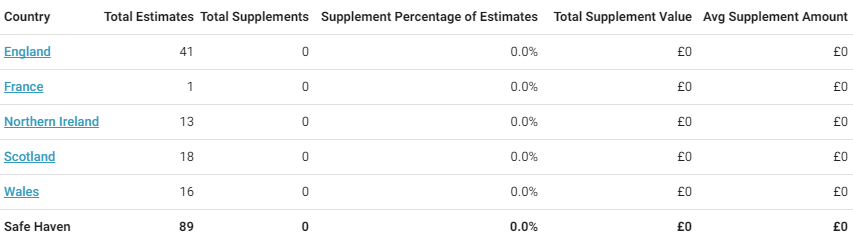
This report displays supplement estimate information, including the number of supplements and their value. A supplement is created when an estimate has been closed but is then reopened so changes can be made.
- Select a geographic/organisational area link to see data for other levels of your hierarchy, including individual estimates.
Columns
Region / Office Level: Geographic/organisational area
Total Estimates: Number of total estimates
Total Supplements: Number of supplements
Supplement Percentage of Estimates: Percentage of supplements out of total estimates
Total Supplement Value: Total supplement value
Avg Supplement Amount: Average supplement value
Supplements and Corrections by Reason
This report displays supplement and corrections estimate information by the reason for the supplement or correction. A supplement is created when an estimate has been closed but is then reopened so changes can be made. Select a reason or geographic/organizational area link to see data for other levels of a hierarchy, including individual estimates.
Corrections Columns
Reason: The reason for the correction (for example: Claim Info/Admin, Line Item/Summary, Reinspection)
Total Returned Estimates: Total number of returned estimates
Total Returned Estimate Value: Total value of returned estimates
Avg. Returned Estimate Value: Average value of returned estimates
Total Assignments with Corrections: Total number of assignments with corrections
Total Estimate Value with Corrections: Total value of estimates with corrections
Total # of Corrections: Total number of corrections made to estimates
Total # Onsite: Total number of estimates that were created at the peril location
Correction % of all Estimates: Percent of estimates that had corrections
Total Correction Value: Total value of corrections
Avg. Correction Value: Average value of corrections
% Increase of Estimate with Correction: The percent of the increase in value of only estimates with corrections
% Increase of All Estimates: The percent of the increase in value of all estimates resulting from corrections
Supplements Columns
Reason: The reason for the supplement (for example: Code Issues, Open Items, Pricing, Reinspection, Scope Changes)
Total Returned Estimates: Total number of returned estimates
Total Returned Estimate Value: Total value of returned estimates
Avg. Returned Estimate Value: Average value of returned estimates
Total Assignments with Supplements: Total number of assignments with supplements
Total Estimate Value with Supplements: Total value of estimates with supplements
Total # of Supplements: Total number of supplements added to estimates
Total # Onsite: Total number of estimates that were created at the peril location
Supplement % of all Estimates: Percent of estimates that had supplements
Total Supplement Value: Total value of corrections
Avg. Supplement Value: Average value of corrections
% Increase of Estimate with Supplement: The percent of increase in value of only estimates with supplements
% Increase of All Estimates: The percent of the increase in value of all estimates resulting from supplements
Peril
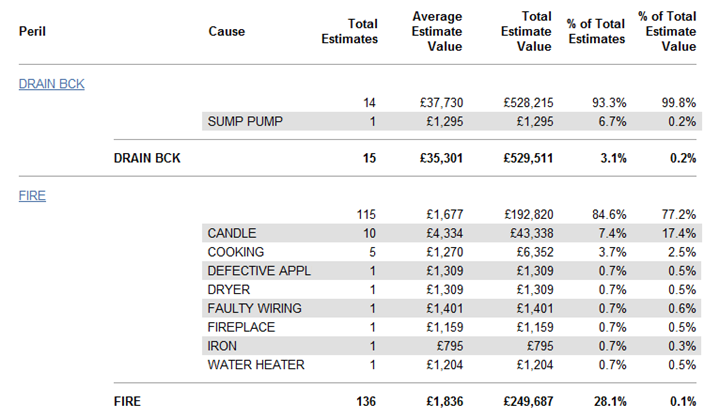
This report displays estimate information by peril, helping you see trends in peril costs.
- Select a link in the Peril column to see data for your hierarchy levels, including individual estimates.
Columns
Peril: Peril category (Collapse, Earthquake, etc.)
Cause : Cause category (Cause categories for a Fire peril could include Candle, Cooking, Defective Appliance, etc.)
Total Estimates: Number of estimates
Average Estimate Value: Average estimate value (Total Estimate Value / Total Estimates)
Total Estimate Value: Total estimate value
% of Total Estimates: Percentage of total estimates
% of Total Estimate Value: Percentage of total estimate value
Value Range
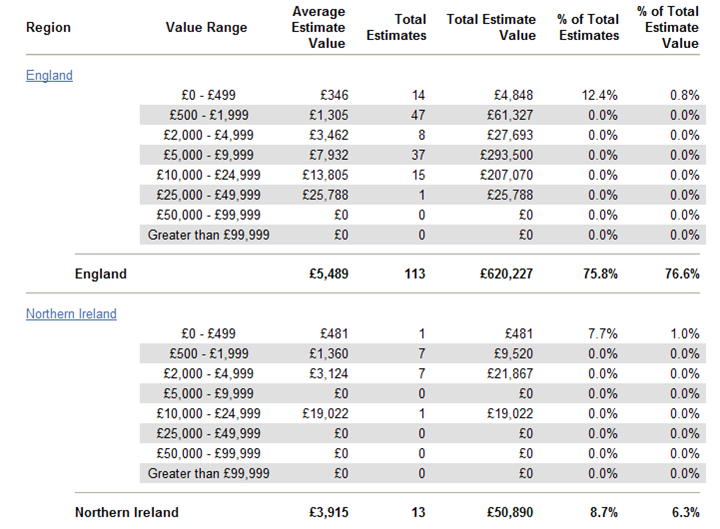
This report displays estimate information by value range and region / office level, helping you track estimates by value range.
- Select a geographic/organisational area link to see data for other levels of your hierarchy, including individual estimates.
Columns
Region / Office Level: Geographic/organisational area
Value Range:
- £0–£499
- £500–£1,999
- £2,000–£4,999
- £5,000–£9,999
- £10,000–£24,999
- £25,000–£49,999
- £50,000–£99,999
- Greater than £99,999
Average Estimate Value: Average estimate value (Total Estimate Value / Total Estimates)
Total Estimates: Number of estimates
Total Estimate Value: Total estimate value
% of Total Estimates: Percentage of total estimates
% of Total Estimate Value: Percentage of total estimate value