Personal Rule Notifications
 Updated
by
Arianne G.
Updated
by
Arianne G.
- Access Personal Rules
- Add a personal rule
- Edit a personal rule
- Duplicate a personal rule
- Delete a personal rule
- Elapsed Time Rules
- Category and Event definitions
- Assignment Tracking
- Action Item Created
- Advance Request Returned
- Appointment Date
- Assigned from Queue
- Assignee Notified
- Assignment Cancelled
- Assignment Delivered
- Assignment Documents Received
- Assignment Initial Reviewed
- Assignment Initial Reviewed with Exceptions
- Assignment Received
- Assignment Rejected
- Assignment Reviewed
- Assignment Reviewed With Exceptions
- Assignment is Client Approved
- Assignment is Client Rejected
- Assignment is QA Approved
- Assignment is QA Rejected
- Attention Needed
- Bid Item
- Claim Rep Notified
- Claim # Changed
- Claim Search Report Available
- Client Billed
- Corrected Estimate Uploaded
- Corrected Estimate Uploaded (include reassignments/referrals)
- Corrected Task List Uploaded
- Customer Contacted
- Delayed
- Desk Adjuster Reassigned
- Desk Adjuster Removed
- Estimate has Copied Items
- Estimate with Depreciation
- Estimate with High Value Contents Item
- Estimate with No Depreciation
- Estimate with No Overhead & Profit
- Estimate with No Photos
- Estimate with No Sketch
- Estimate with No Tax
- Estimate with Overhead & Profit
- Estimate with Sketch
- File Closed
- File Reopened
- Final Flood Report Returned
- First Report Uploaded
- Flooring Analysis Report Uploaded
- Image Uploaded to Estimate
- Image Uploaded without Description
- Independent Analysis Report Uploaded
- Job Completed
- Job Not Sold
- Job Started
- MISC Line Item Lump Sum
- Market Conditions Lump Sum
- New Assignment in Queue
- Note Added to Assignment
- Original Estimate Uploaded
- Photo Sheet Report Uploaded
- Planned Inspection Date
- Preliminary Flood Report Returned
- Previous Loss Info Available
- Proof of Loss Returned
- Reassigned
- Removed From Estimate Review Queue
- Reserve Amount
- Reviewer Assigned
- Roof Measurement Analysis Completed
- Roof Measurement Analysis Requested
- Site Inspected
- Target Completion Date Updated
- Target Start Date Updated
- Underwriting Checklist Report Uploaded
- Underwriting Checklist Exception Occurred
- Vendor Document Uploaded
- Verisk Climate Report Requested
- Video Collaboration Added
- XA or XASP Document Uploaded
- Changes to Price List Items
- Any rule in this group
- Basic Variation
- Line Item Price Deviation
- NFCP Variation
- Not in the Price List Variation
- Percent of Items with All Changed
- Percent of Items with Description & Unit
- Percent of Items with Description Changed
- Percent of Items with No Change
- Percent of Items with Price & Description
- Percent of Items with Price & Unit
- Percent of Items with Price Changed
- Percent of Items with Unit Changed
- Zero Dollar Items Variation
- Contents Tracking
- Estimate Dollar Value
- Estimate Depreciation Options
- Depreciation applied to Material
- Depreciation applied to Non-Material
- Depreciation applied to O&P
- Depreciation applied to Removal
- Depreciation applied to Sales Tax
- Depreciation not applied to Material
- Depreciation not applied to Non-Material
- Depreciation not applied to O&P
- Depreciation not applied to Removal
- Depreciation not applied to Sales Tax
- Estimate Scope Overlap and Item Inclusion
- Industry Trend
- Any rule in this group
- Average Estimate Value
- Basket of Goods Labor & Materials
- Basket of Goods Material Only
- Carpet Material Composite
- Carpet Replacement-Material and Labor
- Contents Packout & Cleaning
- Drywall Material Composite
- Fire Damage – Medium Size
- Garage Door Replacement-Mat. and Labor
- Int. Door Replacement-Material and Labor
- Interior Trim Material Composite
- Kitchen Smoke Damage
- Laminated Shingle - Labor & Materials
- Lumber Material Composite
- Paint Material Composite
- Price List Changes
- Retail Labor
- Retail Labor by Trade
- Roof 25 yr Shingle – Labor & Materials
- Roofing Material Composite
- Small Bathroom Water Loss
- Small Hail Loss
- Small Vandalism Loss
- Vinyl Flooring Material Composite
- Water Damage Mitigation Estimate
- Wood Floor Refinish-Material and Labor
- Labor Minimums
- Management Reports
- Price List Item Usage
- Price List Items by Quality
- Reinspections
- Assignment Tracking
The Personal Rules module allows you to set up notifications to inform you when events occur within a specified data set and category. You can instruct XactAnalysis® Quality Review (QR) to notify you when assignments’ statuses change, estimate value thresholds are surpassed, certain items are included in estimates, and a variety of other events. The Personal Rules module helps you monitor service provider activity as well as regional and organizational estimate anomalies and trends.
When working with personal rules, it’s important to remember that the assignor is the creator of the assignment (in most cases, the insurance carrier). The assignee is the recipient of the assignment (the service provider).
The screenshots in this document are generic, and your company’s interface may vary.
Related: Program Rules, Notification Center
Access Personal Rules
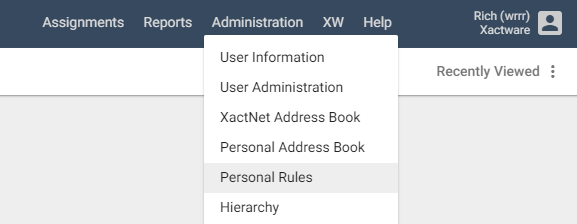
- Select Personal Rules from the Administration menu.
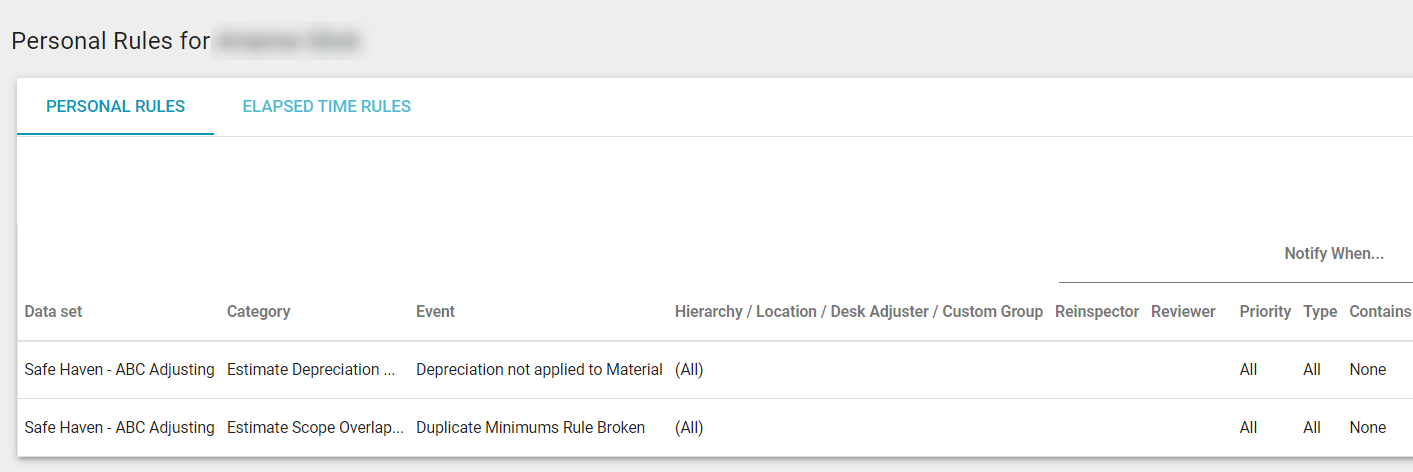
- You will see the Personal Rules page.
Add a personal rule
- On the Personal Rules page, select Add New Rule. The Add Personal Rule dialog box appears.
- If the rule is only for an individual, select the Personal Rule radio button. If you want to apply the rule for a group of people, select the Group Rule radio button and select the group name from the Select a Group menu. Groups can be created in Custom Groups.
- Select how you would like to receive notifications: via email or within XactAnalysis.
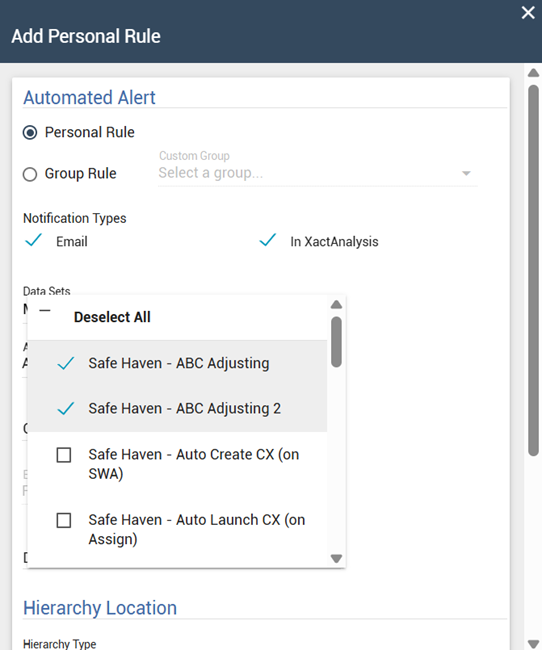
- Select the Data Set menu to select the data set(s) in which you want the personal rule applied.
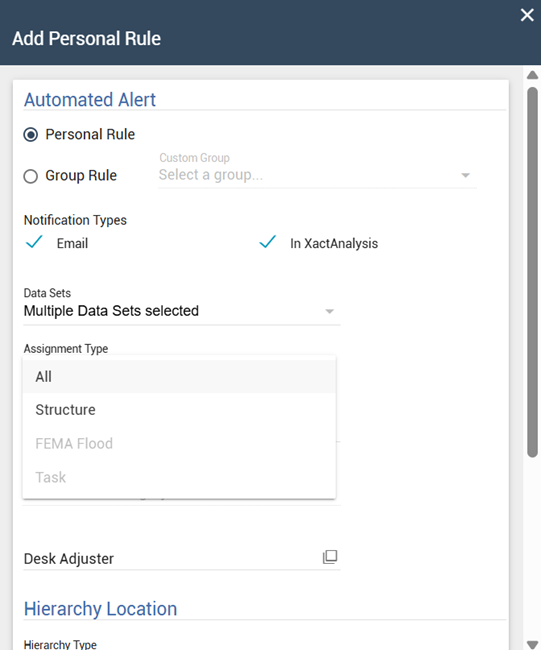
- Open the Assignment Type menu and select either All, Structure, or Task. If you do not select an assignment type, the selection will default to All.
- Open the Category menu to select the notification category. Options include the following:
- Assignment Tracking
- Changes to Price List Items
- Contents Tracking
- Contractor Capacity
- Estimate Depreciation Options
- Estimate Dollar Value
- Estimate Scope Overlap and Item Inclusion
- Industry Trend
- Management Reports
- Price List Item Usage
- Price List Item by Quality
- Open the Event menu to select the event for which you want notification. The list that appears is dependent on the category you chose in the Category menu.
- After you select an event, additional fields will appear below. These fields will be different depending on the event you selected. Complete the fields.
- Open the Hierarchy Type menu to choose one of the following notification hierarchies:
- Geographic
- If you choose Geographic, select the Area/Org Levels smart list button to set an area or organization level.
- Organizational
- If you choose Organizational, select the Area/Org Levels smart list button to set an area or organization level.
- Custom Group
- If you choose Custom Group, select the Group Name smart list button. Then, select an available custom group.
- Individual
- If you choose Individual, enter an adjuster or contractor’s name.
- The new rule will be enabled by default. If you want the rule to be disabled, select Disable rule.
- Select OK.
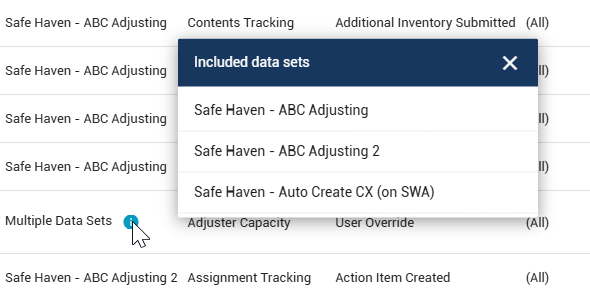
After a rule is created, it will appear in the Personal Rules table, along with pertinent information. If a rule applies to multiple data sets, you can select the Info icon to view a list of included data sets.
Edit a personal rule
To edit a personal rule, open the drop-down menu at the end of the rule’s row. It looks like three dots stacked on top of each other. From within the drop-down menu, select Edit rule.
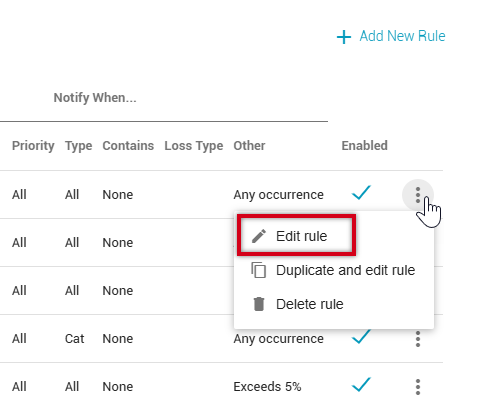
The Edit Personal Rule dialog box appears. Make your edits and select Save and close when you are finished.
Duplicate a personal rule
Duplicating a personal rule allows you to copy a new or existing rule and adjust it to suit your needs.
- Find the rule you wish to duplicate and open the drop-down menu at the end of the rule’s row. It looks like three dots stacked on top of each other.
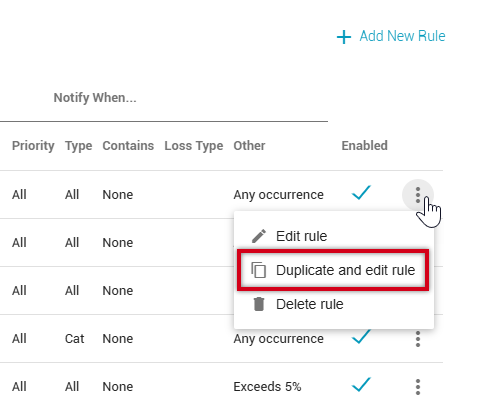
- Select Duplicate and edit rule. The Edit Personal Rule dialog box appears.
- Make any changes needed to the duplicated rule, including changing the selected insurer(s).
- Once you are finished making your changes to the duplicated rule, click Save and close.
Delete a personal rule
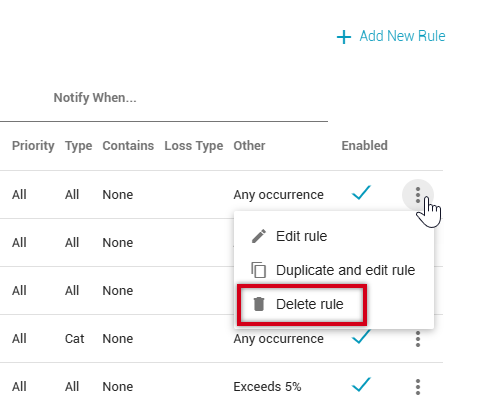
To delete a personal rule, open the drop-down menu at the end of the rule’s row. It looks like three dots stacked on top of each other. From the drop-down menu, select Delete rule.
Elapsed Time Rules
Elapsed Time Rules are similar to Personal Rules but are better-suited to a time-sensitive workflow. Rather than simply notifying you when an event occurs, elapsed time rules notify you when the set time period between two events (when a status is achieved) is exceeded. See Statuses for event definitions.
Elapsed Time Rules is located on the Personal Rules page, directly below Personal Rules. Elapsed Time Rules are added, edited, and deleted in a similar way to Personal Rules.
Category and Event definitions
Most of the categories and events that trigger a personal rule are self-explanatory, but for your convenience, definitions for each of these are provided in this appendix.
Assignment Tracking
The events in the Assignment Tracking category are used to notify you about changes in an assignment, including statuses, updates, inclusions, or exclusions.
Action Item Created
This event is used to notify you when an action item is created.
An Action Item is a task created in XactAnalysis by an assignor (anyone with the Edit Action Items application right) that needs to be accomplished or followed up by an adjuster/contractor.
Advance Request Returned
This event is used to notify you when an Advance Request flood report is returned from Xactimate.
Appointment Date
This event is used to notify you when a date has been entered in the Appointment Date field.
Assigned from Queue
This event is used to notify you when an assignor (anyone with the Send Work Assignments application right) assigns an assignment from the Assignment Queue to an adjuster/contractor.
Assignee Notified
This event is used to notify you when the assignee has received notification of a new assignment.
Assignment Cancelled
This event is used to notify you when an assignment is cancelled. Only XactAnalysis users with the Cancel Assignments application right can cancel assignments.
Assignment Delivered
This event is used to notify you when adjusters or contractors connect to XactAnalysis and download assignments to their Xactimate® accounts.
Assignment Documents Received
This event is used to notify you when assignment documents, such as the Estimate Audit Report or Report Rough Draft, are uploaded to XactAnalysis from an adjuster/contractor.
Assignment Initial Reviewed
For companies that use the Multiple Review Queue, this event is used to notify you when a reviewer has completed the initial review of an assignment and updated its status to Initial Review Complete.
Assignment Initial Reviewed with Exceptions
For companies that use the Multiple Review Queue, this event is used to notify you when a reviewer has completed the initial review of an assignment, but finds problems with the assignment and has updated its status to Initial Review Completed with Exceptions.
Assignment Received
This event is used to notify you when XactAnalysis receives a new assignment into the Assignment Queue or for a specific adjuster or contractor. If the assignment was sent to the Assignment Queue first, the Received date is updated when it is assigned to an adjuster or contractor. After being assigned the first time, the Received date is no longer updated (the Reassignment, Referral, or Collaboration statuses are used instead).
If this event is set up for a specific adjuster or contractor with the Hierarchy Type set as Individual, then a notification is only sent to you if an assignment is created and assigned to the specified adjusters or contractors simultaneously. If the assignment is created and sent to the assignment queue first, then no notification is sent for this event. To receive notifications for adjusters or contractors being assigned to assignments in the assignment queue, set up the Assigned From Queue personal rule.
Assignment Rejected
This event is used to notify you when adjusters or contractors reject or delete assignments sent to them.
Assignment Reviewed
This event is used to notify you when a reviewer accepts a completed assignment and updates its status to Reviewed.
Assignment Reviewed With Exceptions
This event is used to notify you when a reviewer finds problems with a completed assignment and updates its status to Reviewed with Exceptions.
Assignment is Client Approved
This event is used to notify you when an assignment is updated to Client Approved.
Assignment is Client Rejected
This event is used to notify you when an assignment is updated to Client Rejected.
Assignment is QA Approved
This event is used to notify you when quality assurance on an assignment is met and the assignment is updated to QA Approved.
Assignment is QA Rejected
This event is used to notify you when quality assurance on an assignment is not met and it is updated to QA Rejected.
Attention Needed
This event is used to notify you when an assignment needs urgent attention and its status is updated to Attention Needed. Depending on your companies preferences, an assignment may be marked as needing attention for a number of specific reason.
Bid Item
This event is used to notify you when an adjuster/contractor uploads a completed estimate that includes a bid line item that is greater than a specified dollar amount.
Claim Rep Notified
This event is used to notify you when the first assignment notification is sent to a contractor or adjuster.
Claim # Changed
This event is used to notify you when an existing claim number is changed or when a claim number is added to an assignment that previously had no claim number.
Claim Search Report Available
This event is used to notify you if a claim has a Claim Search Report available.
Client Billed
This event is used to notify you when a client has been billed for the work done on an assignment, and the Client Billed workflow status has been updated accordingly.
Corrected Estimate Uploaded
This event is used to notify you when an adjuster/contractor uploads a corrected estimate.
Corrected Estimate Uploaded (include reassignments/referrals)
This event is used to notify you when an adjuster/contractor uploads a corrected estimate after the estimate has been assigned to another data set.
Corrected Task List Uploaded
This event is used to notify you when a task list for an assignment is corrected and uploaded to XactAnalysis.
Customer Contacted
This event is used to notify you when an adjuster/contractor has indicated through Xactimate that they have made contact with the policyholder. This can be done in XactAnalysis as well. Once an adjuster/contractor has indicated that contact has been made, this indication cannot be removed.
Delayed
This event is used to notify you when an assignment is delayed and may require additional action.
Desk Adjuster Reassigned
This event is used to notify you when an assignment is reassigned to a different desk adjuster.
Desk Adjuster Removed
This event is used to notify you when a desk adjuster is removed from an assignment.
Estimate has Copied Items
This event is used to notify you when an estimate is uploaded that has line items that were copied over from another estimate.
Estimate with Depreciation
This event is used to notify you when an adjuster/contractor uploads a completed estimate with line items that are depreciated greater than or less than a specified amount.
Estimate with High Value Contents Item
This event is used to notify you when an adjuster/contractor uploads a completed estimate that includes a Contents item that has value greater than a specified dollar amount.
Estimate with No Depreciation
This event is used to notify you when an adjuster/contractor uploads a completed estimate with line items with no depreciation.
Estimate with No Overhead & Profit
This event is used to notify you when an adjuster/contractor uploads a completed estimate without overhead and profit included in the estimate total.
Estimate with No Photos
This event is used to notify you when an adjuster/contractor uploads a completed estimate without any photos included.
Estimate with No Sketch
This event is used to notify you when an adjuster/contractor uploads a completed estimate without a sketch included.
Estimate with No Tax
This event is used to notify you when an adjuster/contractor uploads a completed estimate without any tax included in the estimate total.
Estimate with Overhead & Profit
This event is used to notify you when an adjuster/contractor uploads a completed estimate with overhead and profit included in the estimate total.
Estimate with Sketch
This event is used to notify you when an adjuster/contractor uploads a completed estimate with a sketch included.
File Closed
This event is used to notify you when an assignment’s file status is updated from Open to Closed. Once this is done, the assignment can no longer be reassigned or corrected, and Xactimate users can no longer request them from the library.
File Reopened
This event is used to notify you when an assignment’s file status is updated from Closed to Reopened in order to perform additional actions.
Final Flood Report Returned
This event is used to notify you when a Final flood report is returned from Xactimate.
First Report Uploaded
This event is used to notify you when the first report is uploaded to XactAnalysis from Xactimate.
Flooring Analysis Report Uploaded
This event is used to notify you when a Flooring Analysis report for an assignment is uploaded to XactAnalysis from a third-party company.
A Flooring Analysis report is a detailed report that describes the color, quality, price, and other attributes of a flooring sample (carpet, hardwood, linoleum, etc.).
Image Uploaded to Estimate
This event is used to notify you when an adjustor or contractor uploads photos or other images for an estimate.
Image Uploaded without Description
This event is used to notify you when an image is uploaded to XactAnlaysis without a description.
Independent Analysis Report Uploaded
This event is used to notify you when an Independent Analysis report for an assignment is uploaded to XactAnalysis from a third-party company.
An Independent Analysis report is a report compiled by a third-party company that focuses on an aspect of an estimate (roofing, flooring, siding, etc.).
Job Completed
This event is used to notify you when an assignment is updated to Job Completed in XactAnalysis.
Job Not Sold
This event is used to notify you when an assignment is updated to Not Sold in XactAnalysis.
The Not Sold status indicates that the insured or property owner has declined to have work done on their property.
Job Started
This event is used to notify you when an assignment’s status is updated to Job Started in XactAnalysis.
MISC Line Item Lump Sum
This event is used to notify you when an adjuster/contractor uploads a completed estimate that includes a MISC line item that is greater than a specified dollar amount.
Market Conditions Lump Sum
This event is used to notify you when an adjuster/contractor uploads a completed estimate that includes a line item with market conditions that are greater than or equal to 66.67% of the item price.
A market condition is a temporary variation in unit price from the normal price list, usually due to catastrophes.
New Assignment in Queue
This event is used to notify you when a new assignment (as opposed to a resubmitted assignment) enters the Assignment Queue.
Note Added to Assignment
This event is used to notify you when a note is added to an assignment by users or automatic notifications.
Original Estimate Uploaded
This event is used to notify you when an adjuster/contractor uploads an original estimate (as opposed to a resubmitted estimate).
Photo Sheet Report Uploaded
This event is used to notify you when an adjuster/contractor uploads a completed estimate with a Photo Sheet report included.
A Photo Sheet report is a special report created in Xactimate that includes all of the estimate photos in a single PDF file.
Planned Inspection Date
This event is used to notify you when a date has been entered in the Planned Inspection Date field.
Preliminary Flood Report Returned
This event is used to notify you when a Preliminary flood report is returned from Xactimate.
Previous Loss Info Available
This event is used to notify you if a claim has previous loss info available.
Proof of Loss Returned
This event is used to notify you when a Proof of Loss flood report is returned from Xactimate.
Reassigned
This event is used to notify you when an assignment is reassigned to a new adjuster/contractor.
Removed From Estimate Review Queue
This event is used to notify you when an estimate is removed from the Estimate Review Queue.
Reserve Amount
This event is used to notify you when an adjuster/contractor uploads a completed assignment that includes a reserve amount greater than a specified dollar amount.
Reviewer Assigned
This event is used to notify you when a reviewer is assigned to evaluate an completed estimate.
Roof Measurement Analysis Completed
This event is used to notify you when a Roof Measurement Analysis for an assignment is uploaded to XactAnalysis from a third-party company.
A Roof Measurement Analysis is a detailed report that describes a roof’s measurements, square footage, and other attributes.
Roof Measurement Analysis Requested
This event is used to notify you when a Roof Measurement Analysis for an assignment is requested through XactAnalysis from a third-party company.
A Roof Measurement Analysis is a detailed report that describes a roof’s measurements, square footage, and other attributes.
Site Inspected
This event is used to notify you when an adjuster/contractor updates an assignment’s status to Site Inspected after evaluating the damaged property.
Target Completion Date Updated
This event is used to notify you when an assignment's Target Completion Date status is updated.
Target Start Date Updated
This event is used to notify you when an assignment's Target Start Date status is updated.
Underwriting Checklist Report Uploaded
This event is used to notify you when an adjuster/contractor has uploaded a finished Underwriting Checklist report with a completed estimate.
The Underwriting Checklist report is an optional report in Xactimate that lists several questions concerning the final inspection of the property.
Underwriting Checklist Exception Occurred
This event is used to notify you when an Underwriting Checklist report is uploaded with Yes, No, or N/A responses entered on specific questions.
The Underwriting Checklist report is an optional report in Xactimate that lists several questions concerning the final inspection of the property.
Vendor Document Uploaded
This event is used to notify you when a third-party vendor has uploaded a document to an assignment.
Verisk Climate Report Requested
This event is used to notify you when an Verisk Climate weather data report is requested.
Video Collaboration Added
This event is used to notify you when videos, notes, or photos are added to an assignment from a video collaboration.
XA or XASP Document Uploaded
This event is used to notify you when a document is added to an assignment directly from XactAnalysis or XactAnalysis for Service Providers (SP).
Changes to Price List Items
The events in the Changes to Price List Items category are used to notify you about variations made to price list items in an estimate.
Any rule in this group
This event is used to notify you when any of the rules in the Changes to Price List Items category are triggered.
Basic Variation
This event is used to notify you when an adjuster/contractor uploads a completed estimate with a non-zero dollar price list item that has had its unit, price, or description changed.
Line Item Price Deviation
This event is used to notify you when line items in an estimate deviate from the checkpoint price list by a specified percentage.
NFCP Variation
This event is used to notify you when an adjuster/contractor uploads a completed estimate with a National Floor Covering Plan item that has had its unit, price, or description changed.
Not in the Price List Variation
This event is used to notify you when an adjuster/contractor uploads a completed estimate with a variation resulting from a USR, MISC, or other item that does not exist in the price list.
Percent of Items with All Changed
This event is used to notify you when an adjustor or contractor uploads a completed estimate in which the percent of line items that are changed is greater than or less than a specified percent.
Percent of Items with Description & Unit
This event is used to notify you when an adjuster/contractor uploads a completed estimate in which the percent of line items with description or unit changes is greater than or less than a specified percent.
Percent of Items with Description Changed
This event is used to notify you when an adjuster/contractor uploads a completed estimate in which the percent of line items with description changes is greater than or less than a specified percent.
Percent of Items with No Change
This event is used to notify you when an adjuster/contractor uploads a completed estimate in which the percent of line items with no changes is greater than or less than a specified percent.
Percent of Items with Price & Description
This event is used to notify you when an adjuster/contractor uploads a completed estimate in which the percent of line items with price or description changes is greater than or less than a specified percent.
Percent of Items with Price & Unit
This event is used to notify you when an adjuster/contractor uploads a completed estimate in which the percent of line items with price or unit changes is greater than or less than a specified percent.
Percent of Items with Price Changed
This event is used to notify you when an adjuster/contractor uploads a completed estimate in which the percent of line items with price changes is greater than or less than a specified percent.
Percent of Items with Unit Changed
This event is used to notify you when an adjuster/contractor uploads a completed estimate in which the percent of line items with unit changes is greater than or less than a specified percent.
Zero Dollar Items Variation
This event is used to notify you when an adjuster/contractor uploads a completed estimate in which a zero dollar line item’s price changed. Some examples are bid-only items and items from the CAS and PER categories.
Contents Tracking
The events in the Contents Tracking category are used to notify you of changes in Contents assignments.
ARC Overridden
This event is used to notify you when a user overrides a deferred amount in a Contents estimate.
Additional Inventory Submitted
This event is used to notify you when an inventory is submitted via Contents Collaboration after the estimate is uploaded. If an inventory is submitted before the estimate is uploaded, no notification is sent.
Contents Value
This event is used to notify you when an adjuster/contractor uploads a Contents estimate with a contents value that exceeds or is less than a specified dollar value.
Estimate Dollar Value
The events in the Estimate Dollar Value category are used to notify you when estimates come in above or below a specified dollar amount.
Corrected Estimate Value
This event is used to notify you when an adjuster/contractor uploads a corrected estimate that is greater than or less than a specified dollar amount.
Estimate Value
This event is used to notify you when an adjustor or contractor uploads a corrected estimate that is greater than or less than a specified dollar amount.
Estimate Depreciation Options
The events in the Estimate Depreciation Options category are used to notify you when different types of depreciation are applied in estimates.
Depreciation applied to Material
This event is used to notify you when an adjuster/contractor uploads an estimate with depreciation applied to material.
Depreciation applied to Non-Material
This event is used to notify you when an adjuster/contractor uploads an estimate with depreciation applied to non-material.
Depreciation applied to O&P
This event is used to notify you when an adjuster/contractor uploads an estimate with depreciation applied to O&P.
Depreciation applied to Removal
This event is used to notify you when an adjuster/contractor uploads an estimate with depreciation applied to removal.
Depreciation applied to Sales Tax
This event is used to notify you when an adjuster/contractor uploads an estimate with depreciation applied to sales tax.
Depreciation not applied to Material
This event is used to notify you when an adjuster/contractor uploads an estimate with depreciation not applied to material.
Depreciation not applied to Non-Material
This event is used to notify you when an adjuster/contractor uploads an estimate with depreciation not applied to non-material.
Depreciation not applied to O&P
This event is used to notify you when an adjuster/contractor uploads an estimate with depreciation not applied to O&P.
Depreciation not applied to Removal
This event is used to notify you when an adjuster/contractor uploads an estimate with depreciation not applied to removal.
Depreciation not applied to Sales Tax
This event is used to notify you when an adjuster/contractor uploads an estimate with depreciation not applied to sales tax.
Estimate Scope Overlap and Item Inclusion
Before uploading an estimate to XactAnalysis, Xactimate checks it for any inconsistencies or possible errors. The events in the Estimate Scope Overlap and Item Inclusion category are used to notify you when any of these possible inconsistencies or errors remains unresolved after the estimate is uploaded. These events vary by company.
Dry PatchJ Rule Broken
This event is used to notify you that a dry patchJ rule has been broken.
Florida Estimate Includes Depreciation Rule Broken
This event is used to notify you that an estimate originating in the state of Florida includes a broken Depreciation rule.
Mandatory Forms Rule Broken
This event is used to notify you that a mandatory forms rule has been broken.
Industry Trend
The events in the Industry Trend category are used to notify you when the values from one or more Industry Trend reports increase or decrease from the previous month by a specified percent or amount.
Any rule in this group
This event is used to notify you when any of the events in the Industry Trend category are triggered.
Average Estimate Value
This event is used to notify you when the values of the monthly Average Estimate Value report increase or decrease by a specified amount or percent.
Basket of Goods Labor & Materials
This event is used to notify you when the values of the monthly Basket of Goods Labor & Materials report increase or decrease by a specified amount or percent.
Basket of Goods Material Only
This event is used to notify you when the values of the monthly Basket of Goods Material Only report increase or decrease by a specified amount or percent.
Carpet Material Composite
This event is used to notify you when the values of the monthly Carpet Material Composite report increase or decrease by a specified amount or percent.
Carpet Replacement-Material and Labor
This event is used to notify you when the values of the monthly Carpet Replacement-Material and Labor report increase or decrease by a specified amount or percent.
Contents Packout & Cleaning
This event is used to notify you when the values of the monthly Contents Packout & Cleaning report increase or decrease by a specified amount or percent.
Drywall Material Composite
This event is used to notify you when the values of the monthly Drywall Material Composite report increase or decrease by a specified amount or percent.
Fire Damage – Medium Size
This event is used to notify you when the values of the monthly Fire Damage – Medium Size report increase or decrease by a specified amount or percent.
Garage Door Replacement-Mat. and Labor
This event is used to notify you when the values of the monthly Garage Door Replacement-Mat. and Labor report increase or decrease by a specified amount or percent.
Int. Door Replacement-Material and Labor
This event is used to notify you when the values of the monthly Int. Door Replacement-Material and Labor report increase or decrease by a specified amount or percent.
Interior Trim Material Composite
This event is used to notify you when the values of the monthly Interior Trim Material Composite report increase or decrease by a specified amount or percent.
Kitchen Smoke Damage
This event is used to notify you when the values of the monthly Kitchen Smoke Damage report increase or decrease by a specified amount or percent.
Laminated Shingle - Labor & Materials
This event is used to notify you when the values of the monthly Laminated Shingle – Labor & Materials report increase or decrease by a specified amount or percent.
Lumber Material Composite
This event is used to notify you when the values of the monthly Lumber Material Composite report increase or decrease by a specified amount or percent.
Paint Material Composite
This event is used to notify you when the values of the monthly Paint Material Composite report increase or decrease by a specified amount or percent.
Price List Changes
This event is used to notify you when the values of the monthly Price List Changes report increase or decrease by a specified amount or percent.
Retail Labor
This event is used to notify you when the values of the monthly Retail Labor report increase or decrease by a specified amount or percent.
Retail Labor by Trade
This event is used to notify you when the values of the monthly Retail Labor by Trade report increase or decrease by a specified amount or percent.
Roof 25 yr Shingle – Labor & Materials
This event is used to notify you when the values of the monthly Roof 25 yr Shingle – Labor & Materials report increase or decrease by a specified amount or percent.
Roofing Material Composite
This event is used to notify you when the values of the monthly Roofing Material Composite report increase or decrease by a specified amount or percent.
Small Bathroom Water Loss
This event is used to notify you when the values of the monthly Small Bathroom Water Loss report increase or decrease by a specified amount or percent.
Small Hail Loss
This event is used to notify you when the values of the monthly Small Hail Loss report increase or decrease by a specified amount or percent.
Small Vandalism Loss
This event is used to notify you when the values of the monthly Small Vandalism Loss report increase or decrease by a specified amount or percent.
Vinyl Flooring Material Composite
This event is used to notify you when the values of the monthly Vinyl Flooring Material Composite report increase or decrease by a specified amount or percent.
Water Damage Mitigation Estimate
This event is used to notify you when the values of the monthly Water Damage Mitigation Estimate report increase or decrease by a specified amount or percent.
Wood Floor Refinish-Material and Labor
This event is used to notify you when the values of the monthly Wood Floor Refinish-Material and Labor report increase or decrease by a specified amount or percent.
Labor Minimums
The events in the Labor Minimums category are used to create automatic notifications that relate to Labor minimums. A labor minimum is a dollar amount an adjuster or contractor may charge for just showing up to do a job.
All Labor Minimums Disabled
This event is used to notify you when an estimate has no labor minimums enabled.
Estimate has Labor Minimum Adjustment
If the actual estimate ends up being less than the labor minimum, Xactimate adds the necessary dollar amount to increase the estimate to the labor minimum amount required by the adjuster or contractor. This is the labor minimum adjustment. This event is used to notify you when Xactimate has added a labor minimum adjustment to an estimate.
Labor Minimums Enabled
This event is used to notify you when an estimate has one or more labor minimums enabled.
New Construction Turned Off
This event is used to notify you when an estimate that uses labor minimums is uploaded to XactAnalysis without selecting the New Construction option in Xactimate.
New Construction Turned On
This event is used to notify you when an estimate that uses labor minimums is uploaded to XactAnalysis with the New Construction option selected in Xactimate.
Management Reports
The events in the Management Reports category are used to notify you when the most common management reports are updated and cached for quick viewing in XactAnalysis.
Depreciation Usage
This event is used to notify you when the Depreciation Usage management report is updated and cached.
Inclusion Issues
This event is used to notify you when the Inclusion Issues management report is updated and cached.
Overhead and Profit
This event is used to notify you when the Overhead and Profit management report is updated and cached.
Price Deviations
This event is used to notify you when the Price Deviations management report is updated and cached.
Scoping Overlap
This event is used to notify you when the Scoping Overlap management report is updated and cached.
Price List Item Usage
Not in Price List
This event is used to notify you when an adjuster/contractor uploads a completed estimate with a specified percent of line items that are miscellaneous and don’t exist in the checkpoint price list.
USR MISC
This event is used to notify you when an adjuster/contractor uploads an estimate with a USR MISC (user miscellaneous) item and that item exceeds or is less than a specified percentage of the estimate total.
Price List Items by Quality
The events in the Price List Items by Quality category are used to notify you when the percent of items of certain qualities in an estimate exceeds a specified percent.
Any rule in this group
This event is used to notify you when any of the events in the Price List Items by Quality category are triggered.
Percent of Average Quality Items
This event is used to notify you when an adjuster/contractor uploads a completed estimate in which the percent of items that are average quality exceeds a specified percent.
Percent of High Quality Items
This event is used to notify you when an adjuster/contractor uploads a completed estimate in which the percent of items that are high quality exceeds a specified percent.
Percent of Low Quality Items
This event is used to notify you when an adjuster/contractor uploads a completed estimate in which the percent of items that are low quality exceeds a specified percent.
Percent of Premium Quality Items
This event is used to notify you when an adjuster/contractor uploads a completed estimate in which the percent of items that are premium quality exceeds a specified percent.
Reinspections
The Reinspections category and its events only appear when using XactAnalysis QR. These rules are used to notify you when a reinspection assignment changes status.
Reinspection Accepted
This event is used to notify you when a reinspection assignment is accepted by a reinspector.
Reinspection Assigned
This event is used to notify you when a reinspection assignment is assigned to a reinspector.
Reinspection Completed
This event is used to notify you when a reinspection assignment is updated to completed.
Reinspection Rejected
This event is used to notify you when a reinspection assignment is rejected by a reinspector.